Day 1 of my effort to keep off social media was a success. Here’s Day 2.
As I reported yesterday, I’ve decided to take a break from social media and put everything I would have posted on Mastodon in a blog post. I’ve come away with two conclusions:

Day 1 of my effort to keep off social media was a success. Here’s Day 2.
As I reported yesterday, I’ve decided to take a break from social media and put everything I would have posted on Mastodon in a blog post. I’ve come away with two conclusions:
It looks like I’ve finally fixed the Home page issues here.
Back in March, my blog started acting weird. I’d post something new and it wouldn’t show up on the Home page for everyone. It showed up for me, though. At least sometimes.
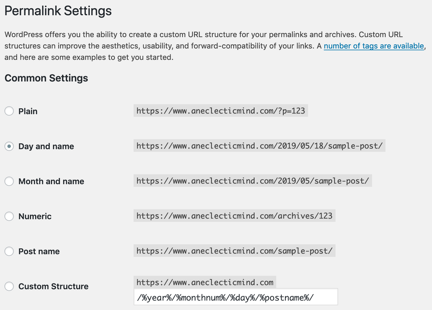
Permalink settings for my WordPress blog.
Then I started having issues with the permalinks. You see, WordPress (the blogging platform I use) stores all of its content in a database. Blog pages don’t exist as regular HTML pages like a regular Website. They’re generated on the fly as needed. The permalink is a formulated URL that brings up a specific blog post or other content. For some reason, my permalinks insisted on including a double slash (//) after the domain name. When I tried to restore them to my preferred format (www.aneclecticmind.com/year/month/day/post-name), my blog would cease working.
This was driving me nuts because I couldn’t figure it out for myself and because I was traveling extensively and simply couldn’t take the time to troubleshoot it with my hosting company. When I got home from traveling, I tried once or twice to get it resolved and failed.
I tried again when I was in Ketchikan last week with my laptop and a few hours to spare. My ISP, Bluehost, escalated it up to Tier 3d. Someone did something and they fixed the permalink issue — although they did set it incorrectly. I corrected it today and it “stuck” without causing the whole blog to come crashing down.
But the Home page refresh issue continued to rear its ugly head. I posted two blog posts earlier today — one as a test and the other to get some half-finished content online. Two individual people contacted me to tell me that the post appeared at the link provided on Twitter but not the Home page. I checked and found the same thing.
I logged in to make sure the posts hadn’t been somehow deleted. They were there. I went to the Home page and they appeared. As they should.
I logged out and checked again. They were gone. The most recent post that appeared was the one I’d written back on March 8.
What the hell?
I called Bluehost to set up another ticket. It took a few tries for the support guy to duplicate the problem. He was certain it was related to caching.
I used to use a caching app to speed up the site. The tech support folks had told me that it might be causing the Permalink issue so I deleted it.
The Bluehost guy couldn’t fix this issue, but he promised to open a ticket and move it up to Tier 2. I thanked him and hung up.
I was unhappy. I like to blog. I’ve been blogging here since 2003 — 16 years in October. There were a lot of things I wanted to say, a lot of stories I wanted to share about my recent travels. I can’t add new content to my blog if my blog isn’t working right.
So I rolled up my sleeve and started poking around in the WordPress files that aren’t in the database. I found a cache folder. Inside the cache folder was a folder named all. That folder was full of numbered folders, including some that corresponded to years and, within them, months. Just like WordPress organizes my post permalinks. There was also an index.html file. I opened it up and guess what I found? The home page that kept appearing for people who weren’t logged in.
I called Bluehost tech support again. Of course, I couldn’t talk to the same guy. The guy I got wasn’t quite as knowledgeable. I told him about the problem and what I’d found. I asked him if he thought I could delete the all folder. He didn’t think that would be a good idea. How about renaming it? Sure. I could always restore the name.
So I renamed all to _all. And I went back to the Home page of my blog. And it properly displayed my most recent post at the top of the Home page.
I asked him to look at it. It showed him the same thing.
I got on Twitter and asked my followers to try it and report back. A handful of them did. It was working right for them, too.
Problem solved.
I deleted the _all folder and everything still works fine. Then I reinstalled a highly recommended cache plugin and turned it on. Still fine.
So at this point, my blog seems to be mostly fixed.
I say mostly because I need to update WordPress to the most recent version and I can’t because the whole blog is running on an old version of PHP and I can’t seem to update it. That already has a Bluehost ticket in Tier 2 going.
Why can’t things be simple?
Or how to lose half a day in front of a computer.
I am the owner of a small business, Flying M Air, LLC. I do just about everything for the company except maintain the aircraft: schedule flights, preflight the aircraft, fly, take payment from passengers, manage the drug testing program, work with the FAA, meet with clients, negotiate contracts, arrange for special events, hire contract workers, record transactions, handle invoicing and receivables, pay bills, create print marketing materials like business cards and rack cards, etc. I also handle the online presence for the company, including the company website, Facebook, and Twitter.
(You might wonder how I have the skills to do all this stuff. The truth is, I have a BBA in Accounting and lots of business training from college. I also wrote books about computers for 20+ years, including several about building websites and using Twitter. Sadly I never studied helicopter repair.)
Today, I lost half a day to marketing and related online chores that were mind-bogglingly time consuming.
You see, I scheduled an event with a local resort, Cave B Estate Winery & Resort in Quincy, WA. Cave B is one of the destinations I take people on winery tours, although I admit I don’t go there very often. For the same price, folks can go to Tsillan Cellars in Chelan, which they seem to prefer. Cave B has a better restaurant and a more interesting atmosphere in a beautiful place. Tsillan Cellars is also in a beautiful place, but it’s a bit touristy for my taste. I actually don’t care which one I fly to since I can’t drink wine at either one. I just like to fly people to wineries.
But the new manager at Cave B Resort is very eager to get the helicopter onsite as an interesting activity for guests. So we set up a 6-hour event there for Saturday, July 2. I’d land in the field as I usually do and offer 15-minute helicopter tours of the area for $75/person. While that might seem kind of steep, it’s pretty much in line with my usual rates. Besides, the folks who stay at Cave B aren’t exactly cheapskates. (I just looked into booking a room for my upcoming birthday and decided that it was a bit too rich for my blood, at least this year. I think I’ll settle for a spa day.)
Setting up this event required me to complete a bunch of tasks on my computer:

I threw together this flyer based on a template in Microsoft Word.
Create a flyer in PDF format that could be used at the resort to let guests know that tours were available that day. I cheated: I used one of the Templates that came with Word 2011 (which I’m still using on my Mac). I already had pictures; I just had to put in the text and make it fit. It took about 30 minutes to complete and I had to make one change after sending it to Cave B’s manager. They’ll print it out on a color printer and, hopefully, put one in each room on Friday.
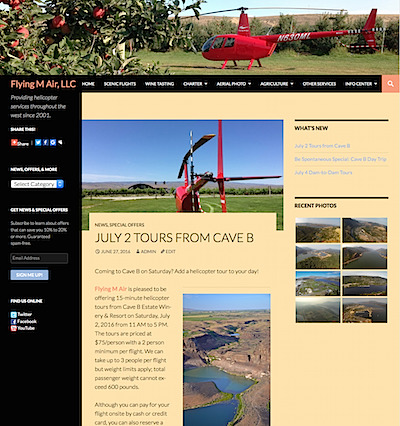
Here’s the top part of the web page I created to announce the special event.
Create a “blog post” on Flying M Air’s website (which was built with the WordPress CMS) to announce the event, provide details, and include the link for buying tickets. Once the post was published, I had to go back and add a featured image so it would appear in the slideshow of items at the top of the Home page. I also had to add an expiration date so that it would stop appearing as a “special” on the site after July 2 at 5 PM. Doing all this took at least another 30 minutes. My WordPress site is designed to automatically post a link to new items on Twitter for both Flying M Air and my own personal account, so at least I didn’t have to fiddle with Twitter.
Of course, while I was working on this, I was also taking calls from a potential client (in the U.K., of all places), texting back and forth with photographers that could help me close a deal with her, and writing reminders for the other things I needed to do at my desk: order wall mount display cabinets from Ikea, choose a garage door opener option (after researching the three options), and send out invitations for a outing on my boat the next day. So I wasn’t 100% focused on the tasks at hand.
I was only mildly surprised when I looked up after that last task and saw that it was after 1 PM.
The whole morning was shot. (No wonder I was hungry.)
But this is typical when I sit in front of my computer — and is why I spend a lot less time in front of my computer these days. Business tasks need to be done and I’m the one that has to do them. It’s a fact of life and I’m not complaining. Just trying to point out that marketing a business isn’t as easy as putting up a website and waiting for the phone to ring — especially with so much social media to deal with.
Clearing out the dead wood.
Just a quick note to let readers know that I’ve cleared out a lot of the Interesting Links posts that are automatically generated here when I bookmark pages on Delicious. This site included posts with links dating all the way back to 2006 — I’m sure a good portion of them are broken or irrelevant at this point.
With over 2500 total posts on this blog, the 400+ Interesting Links posts made up a good portion of the WordPress MySQL database that powers this site. I’m betting that removing the very old posts — more than one year — will speed up site response time, especially after I optimize the database to fully clear them out.
The downside is that anyone attempting to access these old posts — most likely from search engine results — will get an error message. Oh, well.
If you are interested in seeing my bookmarked pages, they can always be found (and searched) on my Delicious account.
Hint: Embedding images in a Microsoft Word file is never a good idea.
 Years ago, I received a flyer in the mailn about a replacement for my helicopter’s stock ground handling wheels. For those of you who don’t know, you move a helicopter around on the ground by attaching wheels that lift the skids off the ground so you can push it. The stock wheels on my helicopter — then an R22 — were too small for me to clear the runners for my hangar door. These larger wheels — called “Big Wheels” — would give me the extra clearance I needed to get over the lip.
Trouble is, I didn’t want to spend $450 on a set of wheels, sight unseen.
So I offered the manufacturer a free Web site in exchange for the wheels. Being a guy who wasn’t particularly Internet savvy, he said yes. And thus began our relationship.
In the ten or so years since then, Walt has given me numerous items of ground handling equipment to test out. Some of it I really liked — like the Big Wheels that he gave me for my R22 and, later, for my R44. Others, not so much — the original tow bar design, for example, wasn’t quite beefy enough to tow my R44 from my hangar to my departure area some distance away at the airport. But it was all great quality stuff that I was pleased to have the opportunity to use and show off. In exchange, Walt got a respectable-looking website, first coded in HTML and then upgraded as a WordPress-based CMS. Lots of pictures — some of which I’d taken with my helicopter as model; the one above is an example. (Yes, my first helicopter had white skids).
The only thing that kind of bugged me over the years was the way Walt requested updates to the site. He’d sometimes send random photos with notes. Sometimes I’d make a requested change and then he’d respond with another change to the same page. I’d get bursts of email messages from him with new content. It got to the point that I’d usually wait a week or two after hearing from him to make sure there wasn’t anything else on the way. That led to me forgetting to take care of things for him and him politely reminding me and me finally getting it done.
Please understand that I don’t mind updating his site periodically. It’s not as if he does it every month — or even every year. It really isn’t (or should’t be) much work. And I use the wheels regularly. I don’t feel as if I’ve done enough work to cover the cost of them yet. After all, it isn’t as if I created some super spectacular custom solution for him. It’s not as if I spent weeks of my life developing and maintaining his site. And he really is a nice man who makes a great product.
About a month or so ago, I got an email message from Walt’s wife. (I didn’t even know he was married.) She wanted to know the best way to request changes. I told her to put them all into one email message.
The email messages started arriving a while later. Note that I used the plural form of the word message. I was busy with other things — a book, travel, etc. — and I didn’t take a look at them right away. She emailed me to confirm that I’d received them. I said I had and would get to it as soon as I could. She waited another week and then sent another email with a note saying that she’d put all the changes in one document, as I’d requested.
Attached was a Word document.
And then I looked at the other email messages. They all included Word documents, too.
I don’t recall asking for a Word document and I know damn well I never told her to embed the images in a Word document. There are few things as painful to me (or likely to anyone else) than removing more than 50 images from a Word document file.
 But what’s worse is that she created it with Word tables and used notes inside the table cells to indicate which images to keep and which ones to remove.
Yes, that’s right — she also sent me images I already had. Images that were on the website.
And did I mention that the images were all different sizes and resolutions and proportions? They look the same here because she resized and cropped them in Word. But they’re all over the map when it comes to size and some of them are as tiny as 2-1/2 inches wide at 72 dpi. This is supposed to replace images that were at least 6 inches wide at 72 dpi. Do you know what they look like when I try to scale them up?
But it’s the inconsistent use of little down-pointing arrows and the positions of the images that I’m struggling with. Is she pointing to a replacement or the one I’m supposed to delete?
Understand that she didn’t reproduce the page the way it appears on the website. She didn’t label them the way they are on the website. From what she’s sent, it’s not even clear whether she’s introducing new products, removing old products, or just playing a really mean joke on me.
Don’t get me wrong. I like Walt and I love his Big Wheels. (Seriously: if you have to pull an R22 or R44 or R66 around, these are the wheels you need.) He’s a nice person and his wife seems very nice, too. It’s extremely difficult, however, to get the job done with what they sent. And not to scream in frustration.
I know they’re doing the best they can. But I also know that this could easily be a post in Clients from Hell.
So now I’m waiting for her to get back to me with more information and possibly some newer, larger photos so I can finish up, take a deep breath, and go have a martini.
Do you understand now why I don’t do websites for other people anymore?