Only the big names get it all for free — and they’re the ones who could afford to buy!
I’ve been writing computer how-to books since 1992. Right now I’m working on a revision of my Mac OS book for Leopard. It’ll be my 70th title.
A lot of people think that I get all the hardware and software I need to write for free. Nothing could be further from the truth. I have to buy most of the hardware I write about. Although I do get much of the software I write about for free, I don’t get the software I need to do my work. So while I might get Office 2007 right from Microsoft and Quicken 2008 right from Intuit (thanks, guys!), I don’t get Photoshop and InDesign from Adobe — and those two very expensive software packages are what I need to lay out and prepare images for my books.
My Past (and Current) Computers
I’m a Mac user and have had numerous Macs since the first one I bought in 1989. Let’s see if I can come up with a complete list.
First, the production machines, which I use to do all my work. These are machines I’ve customized so they look and work just the way I wanted them to. Each of them lasted 2-4 years.
- Mac IIcx – this system cost me $8K including a color monitor and laser printer. It had 1MB RAM.
- PowerMac 7100/66
- PowerMac 8500/167?
- PowerMac G3 (beige; can’t remember speed)
- Power Mac G4/866
 Power Mac Dual G5/1.8 – my current production machine
The 8500 and G4 became servers when they were retired from production duty; indeed, the 8500 ran 8 Web sites, a mail server, and an FTP server until 2005. I also had 2 SE/30s (not listed) way back in the beginning that I used as BBS servers. And, believe it or not, I still have them.
Then there are the laptops. I’ll admit that the first laptop I “owned” was provided by one of my clients to help me do my training job for them. I had it for about 3 years. By then I was hooked and needed my own laptop. A laptop normally lasts me about 4 years.
- PowerBook 180
- PowerBook 520c
- iBook SE (clamshell) – gave it to my neighbor’s kids
- PowerBook G4 (12″) – current laptop; I love this machine
Next, the test mules. These are the machines I bought to run the software I was writing about on. This is where you’ll find a mixture of Macs and PCs, since I do write about PC software (Word, Excel, Quicken, etc.).They’re kept in factory-installed condition — in fact, I commonly reformat and reinstall operating system software on the Macs. (Doing that is a HUGE hassle on the PCs.)
In the old days, I used to use my old production computer as my Mac test mule. But as technology evolved, those older machines didn’t have the hardware features I needed to write about. So I wound up buying new computers for the task and keeping them at least 4 years. Lately I’ve realized that laptops make excellent test mules because of their portability (duh), so I’ve switched to those.
First, the Macs:
- Strawberry iMac (G3) – in my garage; I need to unload this thing
- eMac (G4) – is now a server for Internet streaming at the local radio station. (Yes, the same radio station where they’re doing their accounting with an 18-year-old Mac.)
 MacBook Pro (15″) – current test mule; had thoughts of using it to replace the 12″ PowerBook but I like the PowerBook’s size better for taking it on the road.
Then the PCs:
- Gateway – can’t remember model; it ran Windows 95, which was brand new at the time
- Dell Dimension 944r? – I gave this to the local library; it runs XP so why not?
- Dell Latitude (laptop) – my current test mule. But I think that if Parallels or Boot Camp work out well, I might get rid of it while it still has decent resale value.
Other Hardware
The other hardware list is long and frankly not very interesting.
The list includes the usual collection of monitors (including 2 of the ill-fated 17-in Apple displays). I didn’t replace a monitor when I got a new computer — the Dell Dimension, for example, used the Gateway’s monitor and I’m still using the 20″ Sony monitor, which I think I first connected to my G3 all those years ago, every day. (And yes, I am ready for something bigger now that my close eyesight is starting to fail.)
It also includes printers — five laser printers (four of which are still at work in my house — don’t ask) and a collection of junky dot matrix and later inkjet and “photo printing” printers. I’m sold on laser printers and won’t get conned into buying anything else unless a better technology comes along. Oddly enough, I do very little printing these days, since all of my manuscripts are now submitted electronically. I don’t see my work in print until the edits come back for review.
I’ve had at least 3 scanners, including a SCSI scanner that cost a whopping $1,000. I now use a junky little Canon scanner which is far better and far cheaper than that first one.
 I’ve had to buy numerous AirPort products, including four base stations (two of which I still own) and one AirPort Express. (I got a second one as a gift from Apple for making several appearances at Apple Stores.) I also have two iSight cameras, one of which powers my WebCam.
Speaking of cameras, I’ve also had to buy digital cameras, starting with the QuickTake. I’ve had five of them over the years, each better than the one before it. (My current Canon PowerShot has just died after less than 2 years of life so I’ll probably have to get another one soon.) And digital video cameras — I’ve had three. Why do I need cameras? Have you ever read any of my Mac OS X books? I need to cover how to use Mac OS X with these devices.
 And that’s also why I have three iPods, starting with the original 5GB model and ending (so far) with a sleek little black video iPod.
In the weird department is the Newton Message Pad (call me a sucker; I deserve it) and Twentieth Anniversary Macintosh (which sits in my living room, providing stereo sound and a digital picture frame when hooked up to one of my iPods).
My husband just told me to mention the huge plastic storage bin of cables. That’s where I was able to pull out a vintage 1989 ADB mouse for my friend Jo. I had a bunch of SCSI cables in there, too, but after trying unsuccessfully to give them to an Apple store, I just tossed them into a trash can in the mall. (Those cables cost $25-$50 each when new!) The cable bin is also where you’ll find various microphones and speakers, Zip drives, Jaz drives, and the cartridges that go with them. It’s an antique computer peripheral bin and if anyone needs any of that kind of stuff, Comment below and let me know. Most of it can go for the cost of postage.
Do the Math
That’s about it for the hardware. Do some math. I’m willing to bet that I’ve spent well over $75,000 on computer equipment over the years. In fact, I bet it’s close to $100K. But this is the cost of doing what I do. It’s part of my business expenses.
And yes, I can write it off on my taxes, but I still have to pay for it. A write off is nothing more than a rebate for me. It reduces my total tax liability, but not by the amount I paid — just by my tax rate applied to the amount I paid. For example, if I paid $100 for a piece of hardware and am in a 30% tax bracket, I’m only getting $30 off on my taxes. So the item still cost me $70. It’s nice to be able to write this stuff off, but it doesn’t mean I get it for free.
I’m Not Complaining
Not really. It’s great to be able to work with state of the art hardware. Who could complain about that?
But it would be nice if I got to work with it for free. I don’t mind paying for the stuff that I want to keep and use daily — like my production machines, which I really work hard over the years. But the equipment that I need just to write a few pages of a book — like an iSight camera or the latest AirPort base station — is tough to cough up the dough for. And let’s face it: how many iPods does a person really need? (If your answer is zero, you’ve probably never had an iPod.)
 Recently, Apple very graciously agreed to loan me the new AirPort base station so I could write about the new AirPort Disk feature in my Leopard book. I’m looking forward to getting it and giving it a try. But I’m also looking forward to sending it back when I’m finished and not having to see it on my American Express bill. The AirPort Disk feature looks good, but I simply don’t need it.
(When I get my next production machine in October — probably a 24″ iMac — the dual G5 will be wiped clean and set up as a file server, perhaps with an inexpensive 17″ flatscreen monitor attached. I envision it sitting in my living room near the Twentieth Anniversary Mac, displaying a constant slideshow of photos when guests are around. A true digital picture frame with 120 GB of storage space and an AirPort card ready to accept all the files I want to back up via Time Machine.)
Meanwhile, the big names — and you know who I’m talking about — get everything they want any time they want it for free. In fact, Apple and other hardware/software developers call them and offer it up! It’s the reason why many of these guys have come across as real Apple fanboys. How can you be objective when you know that the first negative thing you say in the pages of the New York Times or Wall Street Journal may stop the next phone call from Apple? And the whole time, these guys are pulling in the big bucks and can actually afford to buy any hardware they want.
Am I jealous? Bitter? What do you think?
But because I pay for it all, I can stay objective. While I really do like what Apple develops and sells, I’m not afraid to mention the shortcomings in a product. (For example, I still can’t figure out why people are buying Apple TVs. At least the Newton I bought was kind of cool.) I can’t ruin my chances of getting the latest gadget — iPhone, Apple TV, etc. — for free because I wouldn’t get it for free anyway.
The Point?
The point of all this is that writing computer how-to books can be a costly endeavor. But I think it’s worth it.



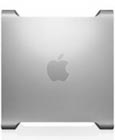 Power Mac Dual G5/1.8 – my current production machine
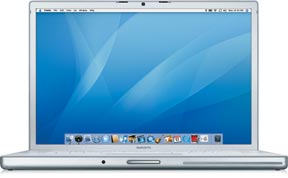 MacBook Pro (15″) – current test mule; had thoughts of using it to replace the 12″ PowerBook but I like the PowerBook’s size better for taking it on the road.
 I’ve had to buy numerous AirPort products, including four base stations (two of which I still own) and one AirPort Express. (I got a second one as a gift from Apple for making several appearances at Apple Stores.) I also have two iSight cameras, one of which powers my WebCam.
 And that’s also why I have three iPods, starting with the original 5GB model and ending (so far) with a sleek little black video iPod.
 Recently, Apple very graciously agreed to loan me the new AirPort base station so I could write about the new AirPort Disk feature in my Leopard book. I’m looking forward to getting it and giving it a try. But I’m also looking forward to sending it back when I’m finished and not having to see it on my American Express bill. The AirPort Disk feature looks good, but I simply don’t need it.