Or how to lose half a day in front of a computer.
I am the owner of a small business, Flying M Air, LLC. I do just about everything for the company except maintain the aircraft: schedule flights, preflight the aircraft, fly, take payment from passengers, manage the drug testing program, work with the FAA, meet with clients, negotiate contracts, arrange for special events, hire contract workers, record transactions, handle invoicing and receivables, pay bills, create print marketing materials like business cards and rack cards, etc. I also handle the online presence for the company, including the company website, Facebook, and Twitter.
(You might wonder how I have the skills to do all this stuff. The truth is, I have a BBA in Accounting and lots of business training from college. I also wrote books about computers for 20+ years, including several about building websites and using Twitter. Sadly I never studied helicopter repair.)
Today, I lost half a day to marketing and related online chores that were mind-bogglingly time consuming.
You see, I scheduled an event with a local resort, Cave B Estate Winery & Resort in Quincy, WA. Cave B is one of the destinations I take people on winery tours, although I admit I don’t go there very often. For the same price, folks can go to Tsillan Cellars in Chelan, which they seem to prefer. Cave B has a better restaurant and a more interesting atmosphere in a beautiful place. Tsillan Cellars is also in a beautiful place, but it’s a bit touristy for my taste. I actually don’t care which one I fly to since I can’t drink wine at either one. I just like to fly people to wineries.
But the new manager at Cave B Resort is very eager to get the helicopter onsite as an interesting activity for guests. So we set up a 6-hour event there for Saturday, July 2. I’d land in the field as I usually do and offer 15-minute helicopter tours of the area for $75/person. While that might seem kind of steep, it’s pretty much in line with my usual rates. Besides, the folks who stay at Cave B aren’t exactly cheapskates. (I just looked into booking a room for my upcoming birthday and decided that it was a bit too rich for my blood, at least this year. I think I’ll settle for a spa day.)
Setting up this event required me to complete a bunch of tasks on my computer:

I threw together this flyer based on a template in Microsoft Word.Create a flyer in PDF format that could be used at the resort to let guests know that tours were available that day. I cheated: I used one of the Templates that came with Word 2011 (which I’m still using on my Mac). I already had pictures; I just had to put in the text and make it fit. It took about 30 minutes to complete and I had to make one change after sending it to Cave B’s manager. They’ll print it out on a color printer and, hopefully, put one in each room on Friday.
- Use Square‘s item feature to set up an item for the tours so I could easily charge passengers for the flights and sell them online. I’ve been experimenting with online sales lately as a tool to get impulse buyers to buy in advance in certain predetermined time slots. So setting up the item also required me to set up the time slots and then create an inventory feature to prevent me from overselling a time slot. This took another 30 minutes or so. This had to be done before I finished the flyer so I could include the URL in the flyer.
- Use bit.ly to create a custom short URL for Flying M Air’s online store. No one could remember the regular URL; maybe they can remember bitly.com/FlyingMAir. This took about 5 minutes. Of course, this also had to be done before the flyer was done so the URL could be included.

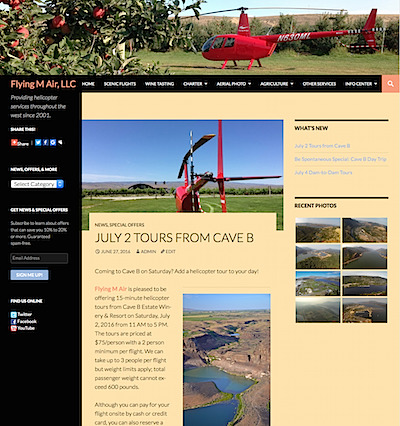
Here’s the top part of the web page I created to announce the special event.Create a “blog post” on Flying M Air’s website (which was built with the WordPress CMS) to announce the event, provide details, and include the link for buying tickets. Once the post was published, I had to go back and add a featured image so it would appear in the slideshow of items at the top of the Home page. I also had to add an expiration date so that it would stop appearing as a “special” on the site after July 2 at 5 PM. Doing all this took at least another 30 minutes. My WordPress site is designed to automatically post a link to new items on Twitter for both Flying M Air and my own personal account, so at least I didn’t have to fiddle with Twitter.
- Create a new event on Facebook for the Cave B Tours. That meant using pretty much the same photo, description, and link I’d put in the flyer in a Facebook form. Because Facebook requires a “Category” for each event and they’re not very creative with the category names, there’s now a “Festival” at Cave B that day. (Sheesh.) This took at least another 20 minutes.
- Share the event with my friends on Facebook. Why not, right? Five minutes.
- Post details on Cave B’s Facebook page for the event. I got lazy and put in a screen shot of the flyer. 5 minutes.
- When I realized that I could probably sell the flight to and from Cave B that I’d have to deadhead for the event, I created a “Be Spontaneous” special offer on Flying M Air’s website, offering up the roundtrip flight for half price: $272.50. That’s less than my cost and a real smoking deal for anyone who wants two great helicopter flights and six hours at Cave B. (I’m thinking lunch, tasting, and a hike.) This took about 30 minutes.
- I also had to set up an item in Square for this offer so I could make it easy to charge for or sell it online. No special URL was required, but I did have to put the link to the item in Flying M Air’s online store in the special offer post. Twenty minutes.
- While I was fiddling with my website, I checked the Special Offers category and discovered a whole bunch of expired offers. So I recategorized them as Expired Offers. Then I spent some time adding a subscription form to the Special Offers page and made sure that page appeared in the slider at the top of the Home page. Anyone who subscribes automatically gets new posts by email; this is a great way to learn about special offers as they become available. I know I spent at least an hour on this.

Of course, while I was working on this, I was also taking calls from a potential client (in the U.K., of all places), texting back and forth with photographers that could help me close a deal with her, and writing reminders for the other things I needed to do at my desk: order wall mount display cabinets from Ikea, choose a garage door opener option (after researching the three options), and send out invitations for a outing on my boat the next day. So I wasn’t 100% focused on the tasks at hand.
I was only mildly surprised when I looked up after that last task and saw that it was after 1 PM.
The whole morning was shot. (No wonder I was hungry.)
But this is typical when I sit in front of my computer — and is why I spend a lot less time in front of my computer these days. Business tasks need to be done and I’m the one that has to do them. It’s a fact of life and I’m not complaining. Just trying to point out that marketing a business isn’t as easy as putting up a website and waiting for the phone to ring — especially with so much social media to deal with.
 Finishing up a special iBooks 2 interactive edition of
  Prepare scripts for a revision of my
  Years ago, I received a flyer in the mailn about a replacement for my helicopter’s stock ground handling wheels. For those of you who don’t know, you move a helicopter around on the ground by attaching wheels that lift the skids off the ground so you can push it. The stock wheels on my helicopter — then an R22 — were too small for me to clear the runners for my hangar door. These larger wheels — called “Big Wheels” — would give me the extra clearance I needed to get over the lip.
 But what’s worse is that she created it with Word tables and used notes inside the table cells to indicate which images to keep and which ones to remove.