I summarize how I see the growth of ebook publishing — and what it means to me.
I’ve been writing traditional print books since 1990 — that’s just over 20 years. In that 20 years, I’ve seen massive growth and changes in the publishing industry. But none of the changes I’ve witnessed were as dramatic as those I’ve seen in the past four years.
My History in Publishing
I got in on the ground floor of the computer how-to book field in 1990. When I started, it soon became obvious that if I wanted to make a living as a writer, I’d have to write a lot of books. (You see, contrary to popular belief, most authors do not make a lot of money writing.) So I buckled down and started churning them out as fast as I got contracts. For years, I wrote or revised an average of two to six books annually. I clearly remember the day I received six book contracts at once; soon after that, I put out ten titles in one year.

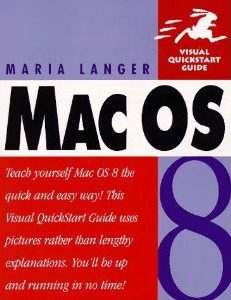
My first bestseller, published in 1997.
It was the advance money that paid the bills. In the beginning, I supplemented that with consulting and classroom training income from hourly or per diem contract work. In 1997, I wrote my first bestseller and, amazingly, in 1998, I wrote another. Revisions on those two books — as well as the new and other revised titles I churned out — earned me a good income and a secure position as a computer how-to book author.
But just as my career took off, so did the Internet. By around 2005, the Internet was offering a lot of free — although often not very complete or well-written — information about how to use computers. Just the the kind of content I was writing — although I like to think I was doing a better job of it. Quality didn’t matter on the Internet; convenience did. If you were working with Excel and needed to perform a task you didn’t know how to do, would you drop everything, run out to a bookstore, and buy a book? Or just do an online search for the information and hope for the best? And why pay for a huge hunk of information when you can get just the information you need for free?
As more and more computer-related content came online, the demand for my books — and I can only assume the books of other authors like me — began to decline. Titles that I’d been revising with every new version of software released were allowed to die, unrevised. The last version of Word I wrote about was 2004; the last version of Excel was 2007. The surviving titles earned out their advance, but often just barely. And with publishers putting out fewer and fewer titles, it was no longer possible to fill in the revenue gap by simply writing more books. There weren’t enough new titles to go around.
The Rise of Ebooks…and their Shortcomings
Of course, while all this was happening, ebooks began to emerge as a real challenger to traditional print publishing. Although ebook readers had been around for a while, it was the Kindle and iPad that put ebooks on the map. But even before this, people had begun reading books in PDF and even HTML format on their computers.
I saw this trend and wanted to jump on board. Maybe it’s because I was simply enthralled by the technology and the idea of being able to travel so easily with books. Or maybe I’d seen the writing on the wall, a sort of foreshadowing of the death of print publishing.
I think it was in January 2008 that I traveled to Macworld Expo in San Francisco and met with my publisher. It was a lunch meeting with two editors and the person in charge of their ebook distribution method. At the time, their ebook publishing consisted of taking specially formatted PDF versions of books and making them available as heavily DRM (digital rights management) protected PDFs and online-accessible files. Their solution introduced several problems:
- The Adobe DRM they used put too many restrictions on an ebook file. I was actually contacted directly by a reader who had bought one of my books and was frustrated by her inability to read it on her PDF reader of choice or transfer it to a different computer.
- The online solution required an active — and relatively fast — connection to the Internet. If you didn’t have an Internet connection, you couldn’t read the book. I don’t know about you, but when I buy a book, I want to be able to read it anywhere.
- The ebooks were not formatted for onscreen viewing. Because the ebooks were basically PDF versions of existing books in their normal (portrait view) layout, viewing the books on a computer’s (landscape view) display — especially a small display, like a laptop’s — made it difficult to see an entire page at a time with print large enough to read. This meant the reader had to combine scrolling and paging to get through a page of text and images. (Remember, tablet computers and, for the most part, compatible ebook readers did not exist yet.)
- All images were in black and white. Why? Because that’s how they appeared in the print book. Instead of reformatting for ebook production, they simply generated a PDF from the files they had. (I should mention here that if the print book was in color, the ebook would also be in color; the vast majority of my books were not in color.)
- Ebooks were priced the same — or nearly the same — as their print book counterparts. So not only were readers expected to accept a completely unsatisfactory reading experience, but they were expected to pay about the same as they would for a paper book.
- Ebooks, once published, were widely available on pirate Web sites. The irony of this did not escape me. People who had paid for the book had trouble reading it, but people who tracked down an illegally distributed copy of the book had no problems at all.
Needless to say, the ebook versions of my books — and the books of all the other authors I’d spoken to — were selling very poorly. I felt that a change needed to be made. I felt that my publisher — a company that had been started by a man with a vision — was bogged down by old technology, old ideas, and fear. They were trying to use print concepts to publish electronically and were paranoid about piracy.
So at that lunch meeting, I introduced my solution. It had several components:
- Break down the content of a book into modular pieces, each of which would contain several related chapters from the book. I took my current Mac OS title, which was selling like crazy, and broke it into five or six topic-based books and presented them with an outline.
- Format each book for the best onscreen reading experience — which, in those days, was landscape view, like a computer monitor’s screen.
- Take advantage of ebook features, like hypertext links to other content in the book or on the Web.
- Include color images for all books — not just the color ones. After all, why not? It doesn’t cost more.
- Do away with DRM. The reader should have a positive experience and be able to read the book wherever he or she wanted to, on any compatible device, with any PDF reader software.
- Price the book low. I suggested $5 tops. The idea was that people weren’t buying the whole book, they were buying the modular components they needed. If they bought all five or six ebooks that made up my entire printed book they’d wind up paying nearly the same as the printed book anyway.
- Stop worrying about piracy. Honest people will pay a reasonable amount for an ebook. Pirates are not the kind of people who would buy books anyway.
To help make my point, I actually prepared a chapter of my existing book as a PDF in the format I imagined. I showed it to my lunch companions on my MacBook Pro. There was no need to scroll; every page was complete and filled the screen. Every word was perfectly legible onscreen. The screenshots looked great. And clickable links led to cross-referenced content. Best of all, I was able to create this version of the book in a few hours of layout work in InDesign, once I’d come up with a good template.
Sounds like I should have sold them on it, right?
Wrong. Although the once small and innovative company had been started by a man with a vision, it was now part of a huge, slow-moving (think plant-eating dinosaur) publishing conglomerate. They weren’t interested in new ideas or new ways of doing things. All they apparently wanted was to cling to the same old print publishing standards and ideas that they’d been using for decades.
In my mind, it was like continuing to rely on monks as scribes after the introduction of moveable type.
Maybe, in the back of management’s minds, they were hoping their failure to make ebooks palatable to readers would cause the whole ebook concept to fail. After all, people had been talking about ebooks for years and there were more than a few failed ebook devices. Maybe this new trend would go the way of the others and they could sink back into the oblivion on their old ways without another thought about this newfangled ebook idea.
They apparently didn’t foresee the Kindle, NOOK, or iPad.
Ebook Readers that People Want
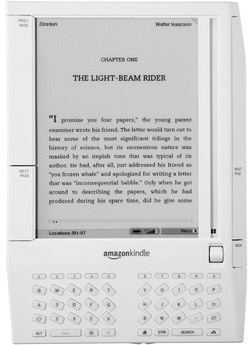
 First Generation Kindle
The Amazon Kindle was first released in November 2007. It wasn’t a very impressive device. Small, awkward, and only able to display 16 shades of gray, I found it completely unappealing. Just another entry into the ebook device market.
Fortunately for Amazon, there were plenty of people more impressed than I was and they sold enough of them to keep developing newer, more impressive models. Today’s Kindle Fire is almost a tablet computer, making it a huge leap forward from that original clunky device.
But what Amazon really got right — and what I think supercharged the ebook publishing movement — is that it:
- Embraced a standard (almost) ebook format, MOBI. Amazon bought MobiPocket in 2005 and uses a version of its ebook format for Kindle Direct Publishing (KDP). This format adjusts page layout so scrolling is never necessary — and enables readers to customize (with limitations) the font and font size.
- Released Kindle reader apps for desktop and mobile computing devices. These apps allow readers to keep a copy of a book on up to five devices and automatically synchronizes last point read, highlights, and notes. Yes, you can start reading a book on your laptop and easily pick up where you left off on your cellphone, while waiting in line for Chinese takeout.
- Made it extremely easy for anyone to publish a book of any length with virtually any content. Now the wannabe novelist can be a published novelist, all without getting a publisher or agent involved. This brings more books to the market, giving readers more choices. Best of all, with these new publishers determining prices and being able to keep 35% or 70% of the retail price (vs. 8% to 20% of the wholesale price), they’re pricing books low (or even free) to move more copies. That benefits readers, who can now afford to buy more books.
So Amazon set the stage with Kindle books. Kindle owners and ebook enthusiasts — people like me interested in the portability of ebook format — stepped up to purchase Kindle books. When it looked as if ebooks might actually thrive this time around, other organizations took notice. In addition to a new crop of ebook readers by personal electronics makers, Barnes & Noble released the NOOK and Apple developed the iPad’s ebook reader platform, iBooks.
Fast-Forward to Today
On May 19, 2011, Amazon.com, the biggest bookseller in the world, announced that it was now selling more ebooks than print books.
To the dinosaurs of print publishing, this must have looked a bit like a meteor coming out of the sky.
While the statistics seem pretty solid and do exclude free ebooks (as they should), they likely do include the huge number of extremely cheap ebooks — those selling for 99¢ or even less. This is throwaway money — the kind of money some people spend without thinking about. I think this lessens the impact of the announcement. After all, “real” publishers aren’t going to sell anything for 99¢. Indeed, it’s difficult to get them to release a book at Amazon’s preferred price point of $9.99.
But what does the announcement tell us about ebook publishing? It tells me that ebooks have a large, viable market. And as technology moves forward, that market will grow. (After all, how many books are being hand-copied by scribes these days?)
Sadly it doesn’t seem as if my print publishers are interested in making the most of this development in ebook publishing. They continue to sell my books in a variety of PDF-based formats — including that online format they were using years ago. While some titles are available in the Kindle (Amazon) and iBooks (Apple iTunes) stores, the series I write doesn’t translate well to those formats. The resulting reading experience is disappointing, to say the least. Books are selling better, but certainly not good enough to have much hope for the future with existing author/publisher relationships.
Embracing the Revolution
Yet as a writer, I’m embracing the ebook revolution.
Like other writers, I see ebooks as a way to get my original content out to readers quickly and easily — without being at the mercy of decision-makers within huge publishing organizations.
But unlike most other writers, I have the benefit of experience at not only writing and editing, but publishing. For years, I’ve been writing and laying out my own books — books that, for the most part, are very lightly edited or revised by my publishers before they appear in print. I know how to write cover copy, how to assign ISBNs, how to register copyright. I know how to market my work. I can publish professionally produced content because — let’s face it — I’m a professional writer.
 The first book in the new Maria’s Guides series.
So I’ve begun publishing my own series of books computer how-to books, Maria’s Guides, which utilizes ebook publishing formats as well as print on demand for people who still want books in print. The first title, Making Movies: A Guide for Serious Amateurs, was published in October 2011 and the second title (to be announced) will be available shortly.
The design and execution of this series is based, in part, on my proposal to my print publisher years ago:
- Short books. Each title will be 50 to 200 printed pages in length.
- Low price. Ebooks will be 99¢ to $4.99; printed books will be $7.99 to $11.99. Length and topic determine pricing.
- Good format. Book design works well both in print and onscreen. Ebook formats utilize hyperlinks for clickable cross-references.
I see this as a way of supporting existing readers of my work by updating the content found in books my publishers have elected not to revise. I also see it as a way of attracting new readers interested in learning the the things they need to know without spending a lot of time digging through online resources that may or may not address their questions.
You can learn more about Maria’s Guides on the Maria’s Guides website. Right now, this site provides support for all of my books, but I’m likely to move support for my other titles to another website later this year.
What Do You Think?
I’d love to know what you think about the ebook (r)evolution and the opportunities it presents to writers. Share your comments on this post. Let’s get a discussion going.

 Next came “the turtle.” My friend Don recommended it to me and that’s what he called it. It’s actually a
  I found the solution on Amazon.com: the Mediabridge High Output Dual USB Car Charger for iPad and iPhone. [Sorry, but as of 30-August-20 this product is no longer listed on Amazon.] This device takes input from 12v to 24v and outputs a total of 3.1 amps: 1 amp on one USB port and 2.1 amps on the other USB port.
 I coupled that with a pair of

 I’ve been working a lot with


 First Generation Kindle
 The first book in the new Maria’s Guides series.