It’s a money grab, plain and simple, and YouTube encourages creators to maximize the number of ads per video.
I’ve been a YouTube content creator for about 15 years now, starting my channels as a way to share videos of things going on in my not-quite-average life. I had the good fortune to create a video that went viral — 12.5 million views so far — and has not only earned me thousands of dollars since I put it on YouTube, but was the driving force to get my subscriber count on the FlyingMAir YouTube channel up to nearly 80,000.
My History as a Content Creator
It’s nice to earn money on content you create or, technically, intellectual property (IP). From 1990, when I left my last full-time job to become a freelance writer and computer consultant, to around 2012, I earned the vast majority of my income as what I insist on calling a content creator. (For some reason, many creators are opposed to that term. I’m not sure why.) I wrote books and articles and made videos for various publishers. I even did a little self publishing of books. I created the content that people wanted to consume. What else would you call that?
During that time, I was able to not only fund the training and asset acquisition for my next career as a helicopter pilot, but I also socked away enough money to retire* at age 62.
My YouTube channels — including the one for Flying M Air which I no longer create videos for — continue to earn me money with a direct deposit into my checking account every month. How is that money earned? Through advertising.
YouTube Ad Revenue
Do what I did: become a YouTube Premium subscriber. (Sign up on the Web and not through your Apple device and you can save $5/month.) Although I was skeptical until I got a free trial, I’m now convinced that it’s worth every single penny. You’ll still have to fast-forward through the sponsorship crap, though.
If you watch YouTube, you know how annoying the ads can be. There are pre-roll ads and post-roll ads and mid-roll ads. You can skip some of them after a few seconds but are forced to sit through others. Most of them are short, but when you have three or four in a row, they take up (too much) time.
For a new channel that cannot be monetized by its creator, the creator has absolutely no control over the ads and doesn’t make a single penny from them. So if you’re watching videos on a channel with 567 subscribers, remember that 100% of the revenue for the ads you see go right to Google. (If that channel creator has a tip jar of any sort and you like the videos, consider sending a few dollars their way to motivate/reward them for hard work.)
Once a channel can be monetized through a share of advertising revenue, creators get a tiny portion — literally just pennies sometimes — on every thousand views. So yeah: unless a video has a lot of views and a lot of ads, you’re not going to make very much. I could go on and on about how some creators game the system to fool people into clicking on their content with misleading titles and thumbnails, but I’ll save that for another day. This post is about the ad revenue.
If you can’t control the number of views a video gets — and new channels usually have a steep hill to climb to get regular viewers — you can still control the number of ads that appear with your content. Again, there are three types: pre-roll, mid-roll, and post-roll. Google isn’t shy about letting you know that the more kinds of ads you allow in your content, the more likely they are to push your content out on viewer Home pages.
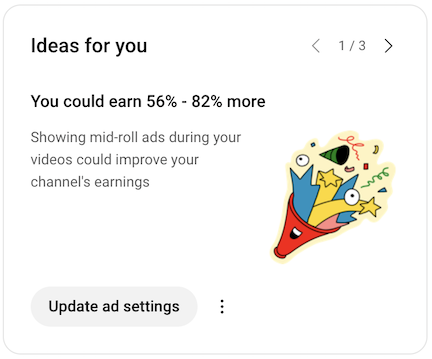
Google does what it can to get you to maximize shared revenue.
And that brings me to what triggered today’s posts: the “idea” that appeared on my YouTube Studio dashboard for my MariaLanger channel, which just reached the point where I can monetize ads. When I set up ads for my existing videos, I specified pre-roll and post-roll ads, but turned off mid-roll ads. Why? Well, the main reason is that I hate them and I don’t want to torture my viewers by forcing them to watch them. I try to make my content smooth and continuous and breaking it up with tacky, annoying ads in the middle of it is, well, tacky and annoying. I respect my viewers.
(That’s not to say I might not change my mind in the future. On very long videos, I can specify exactly where a mid-roll ad can appear, so I can place it in a way to make it less obnoxious. I’d rather not, but I’m also not creating video for charity. I want revenue from my work and the tip jar isn’t working yet for me. Want to support my content creation efforts? Buy me a coffee.)
The reason so many people allow mid-roll ads is because they see “ideas” like this in their Studio dashboard. They want to make money and they are seduced by the possibilities. It’s the same reason they set up memberships or Patreon accounts. Even if they started their YouTube channel for fun, once they get to the point where they’re making money, they want to make more.
The Trap for Creators
Please don’t think I’m discouraging content creators from making YouTube content creation their full time jobs. There are many creators on YouTube who do just that. They have teams of writers — many of whom lean too heavily on Wikipedia — and video editors and they appear as talking heads reading off a teleprompter with a script while stock images that vaguely apply to what they’re saying appear onscreen. They have multiple channels and they come out with new content every day. These folks are making shit-tons of money while they pay a staff to do much of the work. It’s a business for them.
There are a folks with more modest setups that do much of their own research, writing, and video work. Some of them are really good; I subscribe to more than a few. But the ones who are most successful have YouTube content creation as a full-time job. You see, once you stop feeding the beast, the beast looks elsewhere for its next meal.
So unless you’re lucky enough to have a viral video after you’ve already become part of the Partner Program with a share of advertising revenue, you can expect to do a lot of work to build a YouTube channel to the point where it actually makes real money for you. Good luck.
I definitely get it. My FlyingMAir YouTube channel was earning, for a while, $500+ per month. One month, I took in $1200. That’s some real, bill-paying money!
Of course I had mid-roll ads and of course I set up a membership program and even a Patreon account. Do you know what that did for me? It turned content creation back into a job, something I had to do all the time to keep members and patrons and Google happy. I woke up to this realization when I was spending more time editing video than actually flying and watched revenues drop as the Google algorithm favored other creators more than me. I had fallen into a trap and I needed to get out.
Eventually, I sold the helicopter and could no longer create new content for the channel. I killed the membership and Patreon programs so I wouldn’t owe anyone anything. It was a huge weight off my chest.
A New Channel
So here I am, facing a new trap with my MariaLanger channel. This channel is older than FlyingMAir and actually still has a bunch of the helicopter videos I created before I spun off the helicopter channel. But it never had a good subscriber base until recently. I have just 1852 subscribers as I type this and am getting new subscribers at the modest rate of about 90 per month. I qualified for the partner program back in August and just qualified for advertising revenue in October. I’ve earned a whopping $9.03 so far this month.
I should mention here why I suddenly picked up so many new subscribers. It’s the boating videos I was creating while I traveled the Great Loop. And I have at least 40 more to come over the next year or so. The video has been shot; it’s just a matter of editing it into something worth watching. And yes, I’ll be getting back to that, probably this week. Editing video is no fun on a laptop, but I suspect the 27″ monitor I just bought will make it less tedious. That $9.03 will go toward the purchase. (Did I mention how much camera and lighting and audio and computer hardware you’ll need to buy to succeed as a YouTube content creator? That’s something no one tells you.)
And That’s Why
So that’s why there are so many ads on YouTube. Creators want to make money and Google does everything in its power to convince creators to include as many ads as possible in their channel content.
—
*My retirement is not a “stop working” retirement. I could never stop working and I don’t think anyone else should, either. Now I do the work I want to do when I want to do it — and take a shit-ton of time off.