Pleasantly pleased by the quality of service on this original-thinking airline.
I’ve been traveling a lot lately. A lot. And most of that travel has been on four airlines: US Air (formerly America West, hub in Phoenix), Alaska Air (hub in Seattle), American Airlines, and Southwest Air. Since September 2012 — that’s less than six months — I’ve flown to Phoenix, Seattle, Wenatchee, Las Vegas, Sacramento, Dallas, and Jacksonville — in many cases, multiple times to each destination. (And I want to say here how great it is to finally be able to travel without guilt or the restrictions imposed on me by my soon-to-be ex-husband.)
I always favored US Air for my trips between Phoenix and some other city served by US Air. That changed when I began making more trips to Wenatchee, which requires a stop in Seattle along the way; on those flights I use Alaska Air/Horizon. And although I used to use Continental (now part of United) for my trips to Florida through their Houston hub, I switched to American through Charlottesville, NC in 2011.
 I’d flown Southwest Air back in its infancy, when people would queue up two hours before flight time to ensure a seat. I don’t like to wait in line for anything, so I always wound up with a crappy middle seat in the back of the plane. To me, it wasn’t worth saving a few bucks when I couldn’t get a seat assignment. So I avoided Southwest in favor of other alternatives.
Recently, though, I’ve rediscovered Southwest — and I like what I’m seeing. Here are some of my observations.
The End of the Line
Southwest has finally come up with a reasonable way to handle seating that doesn’t require seat assignments (saving them money and effort) and doesn’t require waiting on long lines (saving passengers frustration).
Now, when you check in — preferably online — you get a boarding pass with a letter/number combination that indicates your boarding number. So, for example, someone quick to check in might be assigned B3 (as I was the other day). That means you’ll be the third person to board in the B group. Each group can have up to 60 (I think) people in it. The A group is special: its for people who bought more expensive tickets or paid for earlier boarding. It’s seldom full, so the beginning of the B group isn’t a bad place to be at all. In fact, on my most recent Southwest flight, with a B3 boarding pass, I nabbed a window seat in Row 4. Not too shabby.
Best of all, I didn’t have to pay extra for that seat. Most other airlines, these days, consider front-of-wing seats “premium” seats and can charge $25 or more extra for assignments there.
 My friend Jim didn’t understand how this numbering system could possibly work. I explained how Southwest uses queue-up areas with numbered posts or signs. When the A group is called, people sort themselves in order along these signs, using their boarding passes for reference. It’s all very orderly and civilized — no jostling for position because it’s pretty clear where each person should be in line. Then, after the first half of the group goes through the gate, the first half of the next group lines up. It’s amazingly efficient and I truly believe the plane loads faster.
Two Bags Fly Free
Free baggage check is another way Southwest saves me money.
Unfortunately, because Penny the Tiny Dog usually accompanies me on my trips, her travel bag counts as one of my carry-on items. My large travel purse counts as another. That’s two and that’s the limit on any airline. That means that unless I don’t have any luggage — which is rare — I always have to check at least one bag.
Most airlines usually charge $20 or $25 for the first bag and often up that amount to $40 or $50 for the second bag. (I usually just have one to check.) But Southwest allows you to check two bags for free. As you might imagine, there are reasonable limitations on size and weight — just like there are on other airlines. And if you happen to have a third bag to check, you’ll pay a hefty $75 to check it. But the two bag allowance saves me money.
Baggage Claim No Longer a Big DealI used to hate checking luggage, mostly because of the baggage claim ordeal. Simply said, I — and the person I was often with — didn’t like waiting for luggage.
But now that I fly with Penny, things are different. My first priority, on leaving the plane, is finding a place for Penny to do her business. That means exiting the terminal as quickly as possible, usually in search of a patch of grass. (Phoenix is a really dog-friendly airport; it has a fenced-in dog walk area at each of its three terminals.)
Once Penny has relieved herself, I’m free to go back into the terminal and retrieve my luggage. By that time, my bag is usually already on the carousel and the crowd is gone.
So thanks to Penny, baggage claim is no longer an ordeal at all.

It also saves room in the airplane cabin and speeds boarding. Why? Well, when an airlines charges for checked baggage, people try to save money by carrying on all their luggage. In fact, a passenger is more likely to carry on luggage than check it, so almost everyone on board has the maximum amount of luggage they can slip past a gate agent at boarding time. Big wheelie bags and other large items can be squeezed into the overhead compartments — so they are. Tons of them. This fills the available space quickly and, because they have to be stowed before a passenger can sit down, it requires boarding passengers to wait until each piece is stowed and the passenger gets into his seat.
Last-Minute Flights? Itinerary Changes? No Problem!
I think one of the best things about flying with Southwest is the ability to make changes to your itinerary without paying a penalty. This is extremely important for me these days, as I often need to make changes to existing flights or book last-minute travel.
Here’s an example. I recently booked a flight to Las Vegas about three days before my travel date. I got the same low fare I would have gotten if I’d booked it weeks in advance. Then, while in Vegas, I decided to travel to Sacramento instead of Phoenix. I got online and, with a few clicks, I was able to replace the Vegas to Phoenix flight with a Vegas to Sacramento flight. I was charged for the difference in cost between those two flights: $52.
Like most other airlines these days, Southwest makes it easy to book one-way travel. And because I don’t pay a extra for last-minute bookings, I can leave my travel plans wide open and decide where I want to go when I want to go. This freedom has made a huge difference in the way I travel, giving me opportunities to make spontaneous trips to visit friends and relatives whenever I like.
Don’t get me wrong — the fare category I book is still considered “non-refundable.” That means I can’t get my money back. But it doesn’t mean I can’t use that money to book other travel — without a fee. And with the craziness of my life these days, that’s a huge plus.
There’s an App for That
Airline Apps RankedHere’s a list of the airline-specific apps I’ve tried so far, ranked from best to worst.
- American Airlines – You can book travel, check flight status, check in, display a digital boarding pass at security and the gate, and see maps of many airport terminals.
- Alaska Air – You can check flight status, check in, and display a digital boarding pass at security and the gate.
- Southwest Air – You can book travel, change flights, check in, and check flight status.
- US Air – I found this app nearly useless and actually removed it from my iPhone and iPad. I can’t remember what it did.
Again, this is just an overview based on my limited experience. I think I should do a more detailed review and update this, possibly for a blog post in my upcoming travel blog.
Southwest, like some other airlines, has an iOS app (and likely an Android app, although I really don’t know for sure) for managing travel. In my experience with other airline apps, it’s neither the best nor the worst of the bunch. But it does allow me to do three important things:
- Check in timely. As mentioned earlier, your seat on a Southwest Air plane is determined, in part, by the group and number assigned when you check in. The quicker you check in the better the group and number. Check in opens exactly 24 hours before a flight. I can use a reminder on my Calendar app to warn me when check in time is approaching. I can then use the Southwest app to check in exactly at that time. Sweet.
- Book Travel. I can check fares and book flights from anywhere, right from my phone. This is extremely useful with my travel schedule; a computer isn’t always handy.
- Change Flights. I can look for new flights and swap them into my itinerary, right from my phone. Again, this is extremely useful, given that I often make travel plan changes.
What the app doesn’t do, however, is create a scannable boarding pass that I can use at security or the gate. It seems that Southwest prefers to collect paper boarding passes at the gate. This isn’t a huge deal for me, since I normally have to check a bag anyway and a visit to the check-in counter (or curbside check in) is still required. I usually wind up getting a printed boarding pass there anyway.
Limited Food/Beverage Service
Admittedly, the longest Southwest flight I’ve ever been on was under 2 hours. And during those flights I never once saw a rolling service cart in the aisle.
Why? Because Southwest doesn’t offer a wide variety of food on its short flights. In fact, other than peanuts or pretzels — which are free with beverage service — it doesn’t offer any food. (Again, this might not be true of longer flights, which I haven’t experienced yet.)
Instead, once we complete the climb out on departure, a flight attendant walks down the aisle and takes drink orders. If you’re buying alcohol, she takes payment. Then, a while later, she comes back down the aisle with a tray and distributes the beverages she has orders for, along with a bag of peanuts or pretzels. Simple.
Why do I like this? Well, mostly because it keeps things simple. I seldom get out of my seat during a flight, so the presence (or absence) of a rolling cart doesn’t really affect me. But I like the quick and efficient way the flight attendants can get the job done.
If I want to snack on a plane, I always buy something to eat in the terminal before boarding anyway.
I’m Sold!
All together, these benefits really make it worth flying Southwest as often as possible. It’s now my first choice for airline travel — I just hope it flies to many of the destinations I need to visit.
 This morning, I faced the challenge of finding the model number on a charger for my Black and Decker SmartDriver screwdriver — AKA, my girlie drill. The charger — which also doubles as a base for holding screwdriver heads — was zapped by a power surge and I needed to replace it.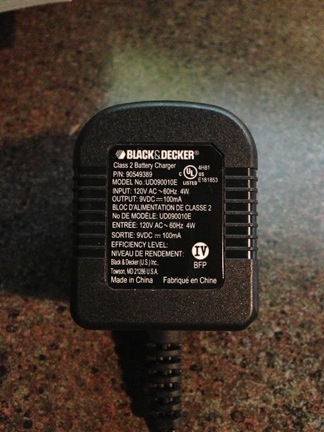


 My friend Jim didn’t understand how this numbering system could possibly work. I explained how Southwest uses queue-up areas with numbered posts or signs. When the A group is called, people sort themselves in order along these signs, using their boarding passes for reference. It’s all very orderly and civilized — no jostling for position because it’s pretty clear where each person should be in line. Then, after the first half of the group goes through the gate, the first half of the next group lines up. It’s amazingly efficient and I truly believe the plane loads faster.
 Afterwards, I used the
  And that’s where things got weird. It showed me the location on the map, but no matter how far I zoomed out, I could not see the dot representing our current location. And then I realized that the body of water on the map was a lot bigger than the lake we’d driven by.
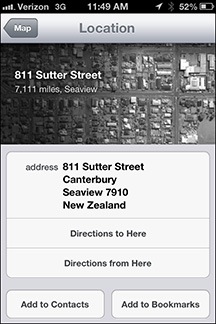 I tapped the arrow beside the location on the map. And that’s when I discovered that the map was showing us a location in New Zealand.
 Style guides help, too. A style guide is a collection of words or phrases that might be used in a work, all presented as they should be in writing. You may have heard of some of the more famous style guides, including
  Individual publishers also have style guides. For example, when I wrote
  Although I never used to have trouble remembering the proper forms and usages of the words and phrases I included in my books, as I’m aging — and as my life becomes more complex — I’m having trouble remembering the little things. So this past summer, when I worked on
  I stumbled onto the solution while writing the book. One of the apps that comes with Mac OS X is Stickies. This is an app whose sole purpose is to put virtual sticky notes up on your screen.
 And so I began creating and maintaining my style guides in Stickies.