
Maria Speaks Episode 31: Podcast Stuff.
This episode marks my return to Maria Speaks after a two-month break. It covers my change in podcasting technique, a new video podcast I just created for Flying M Air, and the podcasts I subscribe to.
Transcript:
Hi, I’m Maria Langer. Welcome to Episode 31 of Maria Speaks: Podcast Stuff.
I just spent the past three hours redoing the Maria Speaks podcast. I used to publish it with Blogger and FeedBurner. Now, since my personal Web site is blog-based using WordPress, I cut Blogger out of the picture. It took me three hours to create or modify blog entries to embed my thirty existing podcast entries on this site. Well, twenty-nine. One of them covered an eBook I no longer distribute, so it didn’t link to it.
I developed this new method of podcasting — new to me, I should say — to reduce the amount of work required to publish a podcast and keep all podcast information together. I used to use a WordPress plugin called podPress, but I removed all references to it and disabled it today. Keep it simple — that’s what I decided. And the technique I worked out is relatively simple, utilizing an existing WordPress blog and FeedBurner. I wrote about it in an article to be published soon by Informit.com. When it comes out, I’ll link to it on the Aritcles page of my Web site and create a podcast based on its content.
For some reason, my “Maria Speaks” podcast has more subscribers than ever. That makes me wonder, since I haven’t released a podcast episode since September, and that episode was a bit more commercial than I like. This time last year, I was releasing one or two episodes per week. I ran out of steam last December and have been releasing them far less frequently. Still, my subscriber numbers have been climbing steadily. It doesn’t make sense to me, but it did convince me to release more content. The way I see it, when all these new subscribers start getting the new content, they’ll either like it and stick around or not like it and leave.
In the meantime, I started a new video podcast in October for my helicopter charter company, Flying M Air. I have literally thousands of photographs taken throughout the southwest, in places I fly to. I also have photos taken by my husband and by professional photographer and Bigfoot Hunter, Richard Noll.
Rick accompanied me on a test run of Flying M Air’s Southwest Circle Helicopter Adventure. The deal we struck was that in return for all all-expense paid trip, he’d let me share copyright on all the video and still images he took. While he has the ability to sell these images as stock photos or use them in other projects, I have the ability to use them in marketing material to help sell the excursions and in articles I plan to write for publication about the trip. It was a win-win deal. Richard took lots of pictures from the air, which is something I simply can’t do while I’m flying. He also took video images with something a few clicks better than the little Canon digital video cameras I have. I’m still going through the over 1,000 still images and 3 to 4 hours of video he left on my MacBook Pro’s hard disk before departing back to the Seattle area.
I decided to turn my library of photos into video brochures for Flying M Air’s tours, charters, and excursions. The result is “Come Fly With Us!” (subscribe), which currently has three episodes. Another episode will be released Monday. (That’s one of the good things about my new podcast publishing technique; I can schedule a publication date and time. This makes it possible to record several podcast episodes at once and release them periodically over time.)
Part of the learning experience for creating this new podcast was finding legal music to play while the images were showing. I wasted a lot of time looking. Some sites promoting “royalty-free” music for podcasts required that you buy the songs to use them. That wouldn’t have been so bad if the songs were sold at iTunes prices or even a few bucks, but they were asking for $25 or $39 dollars per song. I use each song on just one video podcast episode and plan to release new titles once a week until I run out of material. That music was simply over my budget.
The much hyped GarageBand.com promised royalty-free, free downloads music. But the vast majority of artists didn’t allow free downloads of their songs. And since I was looking for relatively mellow instrumentals — you know, mood music — I had trouble finding what I wanted there in the first place.
I finally wound up on MagnaTune.com. I heard about it during an interview with the site’s founder, John Buckman, that Miraz had referred me to. MagnaTune predates iTunes by about two weeks. Although it has a limited number of artists on board, it offers very reasonable licensing of its music for podcast use. I’ve been getting tunes for my “Come Fly with Us!” podcasts from MagnaTunes since then and giving credit to the artists at the end of each video. I hope they sell some music.
Speaking of music, if you’ve been listening to Maria Speaks for a while now, you may have noticed that I changed the “theme song” for this podcast. The reason: I had a one-year licensing agreement with FreePlay Music for the old tune, Floater. Last year, when I bought that license, it cost $25/year, which I thought was reasonable. When I went to renew, the price had gone up to $100/year. I guess they decided to cash in when podcasting took off. That’s above my budget for a free podcast that doesn’t even earn any advertising revenue, so I decided to find a new tune. The new tune is is a segment from a nameless bit that I got off a public domain music CD I acquired back in 1996. I spent about an hour yesterday going through the one thousand plus songs on that CD set to pick this one. I’m not sure how much I really like it, but I do need something for my opening and closing credits.
The main topic of this podcast episode was supposed to be a quick discussion of some of the podcasts I listen to regularly. So let me dive into that for a few minutes.
I want to start off by telling you what I don’t listen to. I don’t like podcasts that mix discussion and “Garage Band” music. For example, I used to listen to a podcast about words hosted by two guys who seemed to guess more about word origins than actually research them. They’d pick few words or phrases and do a 40-minute podcast about them. The way they’d stretch out that podcast is by inserting a few Garage Band songs into it. Trouble was, their taste in music was nothing like mine, so I found myself having to fast forward through the music filler to get to the discussion meat. Fast forwarding is not always easy when you’re listening on an iPod and driving in traffic. When I realized that the content I was interested in wasn’t that good to begin with, I dropped the podcast. Ditto for the writing podcast some woman was doing. I wasn’t listening to hear music. I was listening to hear content. If the content was music related, the music would make sense. But it wasn’t and it didn’t.
In general, I don’t listen to music podcasts at all. Finding new music is low on my priority list. So if you you think you might find some tips for new and exciting music podcasts here, you will be disappointed.
What I do like listening to is podcasts that can enlighten me, teach me new things, or make me laugh with intelligent humor. I listen to podcasts primarily when I’m driving or flying, although I do have a i-Fusion speaker thing that makes it easy to listen when I’m working in the kitchen, making dinner or tidying up. So if I can be trapped in a place doing a relatively mindless thing and listen to something that’ll expand my horizons or make me laugh, I’m pretty happy.
That said, here’s a brief summary of some of the podcasts I listen to. You can find links to these podcasts on the transcript for this podcast. Go to www.aneclecticmind.com and click the Podcast link in the navigation bar to find it.
First on the list are a handful National Public Radio (or NPR) podcasts. There are 355 of these podcasts and I’ve tried at least 20 of them. I listen to five of them regularly.
- NPR: Story of the Day is a daily selection of a story from NPR’s programming. These stories are wide-ranging in topics: business, war, travel, entertainment — you name it.
- NPR: Business Story of the Day is a daily selection of a business story from NPR’s programming. Stories cover anything business related, from Silicon Valley news bits to global oil production information and lots of stuff in between. It keeps me informed about the business world.
- NPR: Satire from the Unger Report is a weekly podcast of satire by Brian Unger. It’ll make you laugh — and think.
- NPR: Wait Wait…Don’t Tell Me! is a weekly radio quiz show about the news. It has a panel of three celebrities (no, not the kind in People magazine) and call-in contestants. The questions and answers lean toward the comical, so the show is extremely entertaining.
- NPR: Sunday Puzzle is a weekly podcast of word games with an NPR host, Will Shortz (of the New York Times), and a telephone contestant.
I’ve tried other NPR podcasts, but eventually lost interest in them. And as I prepared this list, I noticed a bunch of new ones to try out. So I might report on some additional podcasts from NPR in the future.
I also listen to American Public Media (APM) Future Tense. It’s a great podcast with short episodes about technology topics.
I listen to three PBS podcasts:
- American Experience is a podcast with short episodes about historical topics. Recent episodes included the Gold Rush and New York.
- NOVA is a podcast of brief stories from the NOVA science television show.
- NOW is a podcast of rather lengthy stories form the NOW news television show. Sometimes the stories interest me and I listen to them. Other times, the stories don’t interest me and I just delete them.
I also watch a NOVA video podcast, which I find excellent. It combines science information with video and still images in a 2 to 3 minute podcast. I like some episodes so much that I save them as movies on my iPod so I can show them to others.
Speaking of video podcasts, I also subscribe to a number of others:
- GARY-PAUL TV is a video podcast of weird stuff published by Gary-Paul Prince of Peachpit Press. My favorite episode, which I’ve saved as a movie for future viewing, is “Drinking and Driving Texas Style.”
- Comedy Central: Stand-Up is a video podcast of stand up comedy segments. I only like about half of these, but the ones I like arae really good, so I keep checking in.
- National Geographic Video Shorts are short video segments from National Geographic television shows.
I also used to enjoy a video podcast called CockpitCast, which showed video out the front window of various commuter jets as they landed at airports in western U.S. cities, but there hasn’t been a new release in a long time, so I don’t know if the pilots are still doing it.
Another aviation podcast I enjoy is Betty in the Sky with a Suitcase. Betty is a flight attendant who loves to travel. She brings along her tape recorded and gets stories from other flight attendants, pilots, and people at the places she flies to. The stories are great but the audio quality is pretty bad sometimes. Still, I think it’s worth a listen. My favorite story? The one where a passenger who died of natural causes during a flight was not declared dead until after the flight was more than halfway to its destination.
For tech news and info, I’ve been trying two Wired magazine podcasts:
- Wired Magazine is a podcast of short pieces from Wired magazine columns.
- Wired News is a podcast of short news stories from Wired magazine.
I also subscribe to Slate magazine‘s Daily podcast, which includes interviews about Slate’s online pieces as well as audio versions of some of Slate’s online pieces. It gives me a chance to “read” Slate without having to visit the site. Of course, I only get a small portion of the thoughtful gems available online. I used to subscribe to Slate’s Explainer podcast, but have given it up because the topics weren’t all that interesting to me. You might like them, though, so check them and out see for yourself.
I subscribe to the WordPress podcast because of my interest in WordPress software. I admit that I’ve downloaded all episodes and have listened to just three of them. I think the podcast is good, but I have to be in the right frame of mind to listen to them.
The same goes for the Podcasting Underground podcast. Good, informative stuff, but I have to be in the mood to listen to information about podcasting.
For politics, I listen to a pair of real left-wingers. Sorry, but I am not a conservative at all, neo or otherwise.
- Real Time with Bill Maher is an hour-long podcast of Maher’s HBO television series. He does an interview and then discusses one or more current political topics with a panel of three that usually includes one celebrity entertainer and one political figure. His panels always include someone sitting on the right, so both sides are represented. While I don’t agree with everything I hear, I like to hear the various viewpoints on current political topics. New Rules is a much shorter podcast that includes just the New Rules he lists at the end of his show.
- MSNBC Countdown with Keith Olbermann is a collection of Olbermann segments from his MSNBC Countdown television show. Olbermann is a Bush basher — do doubt about it — and it amazes me that he says some of the things he says. It’s a real example of the First Amendment in action — if Olbermann said these kinds of things just once in a place like North Korea or Iran or Iraq under Saddam Hussein, he would have been shot dead for treason. But in our country, we’re allowed to voice all kinds of opinions. Olbermann’s aren’t the kind that’ll ever get on Fox News. My favorite bit? The count of times our president said “Stay the course” after Tony Snow told the press he’d only said it eight times. Classic reporting.
I also started listening to Penn Jillette’s weekday radio show on FreeFM, PennRadio. Penn Jillette is the big, fast-talking guy from the magic duo of Penn and Teller. An atheist (his Nevada license plate is the word “ATHEIST”) and libertarian, he definitely has some non-standard views of politics. But he also covers non-political topics. I don’t enjoy all of Penn’s podcast episodes — I probably delete about half of them without listening to more than a few minutes — but I like enough of them to keep my subscription. One of my favorite episodes was his interview of Phyllis Diller (who I didn’t even know was still alive). Ms. Diller had some fascinating stories to tell and I was especially touched by Penn’s patience when her memory failed her more than once during the interview.
And finally, one of the first podcasts I ever subscribed to, podictionary. This daily podcast, with 2 to 5 minute episodes, discusses the origin of a word or phrase. A weekly digest version is also available. Many, many thanks to Charles Hodgson for his dedication to the subject of word history.
Now you know what I’m listening to. What are you listening to? Share your comments and suggestions with me and other listeners by posting your comments on the transcript for this episode. Go to www.aneclecticmind.com, click the Podcasts link in the navigation bar, and scroll down until you find the “Episode 31: Podcast Stuff” entry. Or just use the Search box to search for the number 31. Then use the Comments link at the bottom of the entry to read other people’s comments and add your own.
And as always, thanks for listening. More later.
 A few months ago, I started thinking about how cool it would be to have a computer conference here in Wickenburg, at my favorite guest ranch:
  So rather than give up the whole thing, I decided to restructure the event. I shortened it from five days to four. I cut the speakers from five to one. I cut the sessions from 12 to just two and made them more discussion based, giving all the participants a chance to share what they knew and ask everyone questions. I arranged the activities so all participants could go together, giving everyone an opportunity to network like crazy outside the meeting rooms. Then, with greatly reduced costs, I recalculated the per-person cost. The numbers I came up with were certainly within reason for a 4-day, all inclusive weekend at a luxury dude ranch.
 Mac Cowboys is a mini-vacation first: a four-day, three-night stay with luxury accommodations at a ranch that can only accommodate about a hundred and fifty people at once. You get yourself to Phoenix Sky Harbor airport or Wickenburg and just about everything else is paid for — ground transportation to and from the ranch, hotel room, three meals a day, horseback riding, golf, Jeep tour, helicopter tour, swimming, tennis, nature hikes — all kinds of activities. There’s even free wi-fi access in certain hotspots throughout the ranch. All you pay for is alcoholic beverages and extras like skeet shooting or golf cart or club rental.
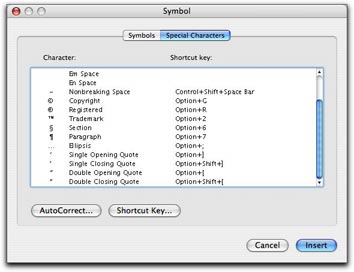 In Word, you can also use the Special Characters pane of the Symbols dialog. Choose Insert > Symbol to display the dialog and click the Special Characters tab or button. Scroll down to find the character you want (they’re listed at the bottom of the list) and double-click the one you want to insert it. This is a rather cumbersome way to get the job done, but it does work.
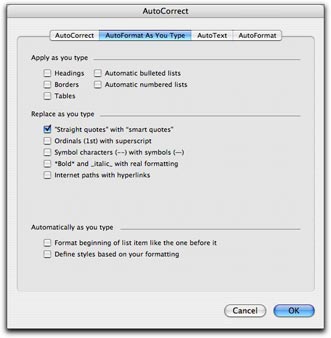 Fortunately, Word offers a better, automated way. You can set an option in the AutoFormat as you Type pane of the AutoCorrect dialog that will automatically convert every straight quote you type to the corresponding smart quote. Choose Tools > AutoCorrect and click the AutoFormat as You Type tab or button in the dialog that appears. Then turn on the “Straight quotes” with “Smart quotes” check box. (As you can see, that’s the only feature I have enabled in this pane on my copy of Word; I don’t like Word messing with the formatting of what I type, as I discuss in “
 First double check to make sure that the “Straight quotes” to “Smart quotes” feature is enabled as discussed above. Then choose Edit > Replace to display the Find and Replace window. Type the same plain old double quote character in the Find What and Replace With boxes. Then click Replace All. Word will replace the dumb double quotes with the correct smart quotes and tell you how many it replaced. Click OK to dismiss the confirmation dialog. Then type the same plain old single quote character in the Find What and Replace with boxes and click Replace All. Word replaces all the dumb single quotes with smart single quotes. Click OK to dismiss the confirmation dialog and close the Find and Replace window.