The Facebook Decision

Unhappily sitting on the fence; here’s why.

A while back, I wrote “Why I Suspended my Facebook Account.” I just reread it and it still rings true. But Facebook has again gotten in my face and I need to make a decision.

Facebook has proliferated to the point where it’s impossible for anyone in business — especially the business of writing computer-related content — to ignore. It’s everywhere. “Friend me on Facebook!” has become the robotic chant of businesses and individuals all over the country. I have tried to play the part of South Park’s Stan but Facebook continues to intrude on my life.

Recently, I discovered that Facebook had created a community page for me based on my Wikipedia entry. The opening paragraph states:

Our goal is to make this Community Page the best collection of shared knowledge on this topic. If you have a passion for Maria Langer, sign up and we’ll let you know when we’re ready for your help. You can also get us started by suggesting the Official Facebook Page.

So I have become a Facebook “topic.” I don’t know if I should be flattered or horrified.

(And, by the way, if you have “a passion” for me, I’d love to know. My husband might be interested, too.)

My Current Career Situation

Meanwhile, my dual careers as the creator of how to books, articles, and video training material about computers (which I’ve been doing for 20 years) and helicopter charter operator (which I’ve been doing for 5 years) are suffering along with the economy.

Print publishing — especially of computer how-to material — is dying a slow and painful death. The widespread availability of the same content — usually for free — on the Internet is destroying book sales. Just about anyone can use Google to find the answer to a computer or software question online. (That doesn’t mean the answer will be right, but that doesn’t seem to matter to anyone.) There are numerous blogs, including one of mine, that provide how-to information with the same step-by-step instructions I built my writing career on for free.

This is what publishers are competing with. They know it and they try to fight back by stressing the simple fact that their content is being created by experts. But no one seems to care. Why spend $20 on a book that might answer a question when you can spend 20 minutes with Google and the World Wide Web and get an answer for free?

As a result, most of my books are not being revised. The most recent casualty to this trend was my Excel for Windows Visual QuickStart Guide which I have been revising since I wrote the first edition for Excel 95. Look all you want for an Excel 2010 edition — you won’t find one.

The world of helicopter charters is even more shaky with the economy the way it is. My last season in Arizona was dismal, with very few good charters — certainly not enough to pay the bills. The agricultural work I do during the summer months is a lifesaver for the business. Without it, I’d likely have to sell the helicopter and close up shop.

And I’m not the only one in this situation. Helicopter operators and flight schools have gone out of business all over the country. Most people simply don’t have money to spend on things they don’t really need. Who needs to fly in a helicopter? Very few people.

Enter, Facebook

Facbook LogoAnd then there’s Facebook, sitting out there, presenting itself as a free way to make contact with potential readers, video learners, and helicopter passengers. A marketing tool, waiting to be used. Like a worm sitting on the grass, waiting for the a bird to snatch it. But is there a string attached that will drag me down into a hole?

I could reactivate my Facebook account. It’s easy. All I have to do is log in. Everything is there, just where I left it.

Of course, I did strip out all my personal information — or whatever information I could — to prevent it from getting into the hands of people I didn’t want to have it. I’d have to build that back up, selectively, to make a real profile page.

Then I’d have to build pages for each of my careers, keeping them up to date. I’d have to visit them regularly to keep in touch with my new “friends” and respond to their comments on my “wall.” I’d have to accept friend requests from strangers and then struggle to figure out which ones were real people and which were spammers trying to sell me their crap. I’d have to find new people to friend. I’d have to post on my wall and their walls. I’d probably have to fiddle around with the never-ending collection of applications, trying to figure out what they do, how they work, and why I should use them. I’d have to build a presence for myself on Facebook, in a community I have no desire to be part of.

I’d be going through the motions just to satisfy fans and mollify editors. I’d be playing the game because it was expected of me. I’d be spending hours of my life every week on a marketing tool that might get me a handful of new readers and video learners but would more likely expand the audience for the free content I already put on the Web.

Time is one of the most valuable things I have. My freelance lifestyle gives me more time than most people have. But I don’t want to waste it. I’d much rather spend it on things that are important to me, learning or doing something interesting, something worth remembering, worth writing about, worth sharing.

Is Facebook any of that?

There’s more to my life than writing on virtual walls and tending to imaginary farm fields.

I don’t want to sell out.

Geocaching Revisited

Hunting for hidden treasures.

Back in 2005, I discovered geocaching, an outdoor activity where people use a GPS to find hidden containers of trinkets. I wrote about my thoughts on the topic — and some big plans that never came to fruition — in some detail here. Because part of the game is to pull something out of a cache and replace it with something else, I started gathering items to share. Among these were some “travel bugs,” which are basically serial numbered tags you can affix to an item so it can be tracked. The tracking is mostly done on the Geocaching.com Web site. That’s also were you can find a list of geocaches just about anywhere in the U.S.

And that’s the interesting thing: these things are everywhere. Did you drive more than 10 miles to work today? I bet you passed at least a dozen of them within 3 miles of your car. There’s one a block from my house in Wickenburg and one 4/10 of a mile from my RV here in Quincy. As this map shows, they’re all over the place:
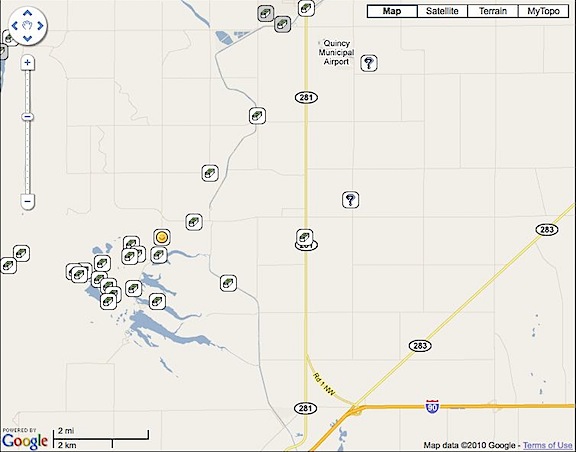
Geocaches Near Me
My RV is just about dead-center in this map. The little box and question mark icons indicate geocaches in the area. The smiley face icon is a geocache I found that I logged.

For some reason, I find the proliferation of these little boxes of hidden “treasure” fascinating. It emphasizes how big the world really is. It also reminds me a bit of a walk my husband, Mike, and I had along the rim of the Grand Canyon once. We got off the beaten path and walked right along the rim, far from where the tourists wander. We happened to stop for a rest on a rock outcropping. And there, tucked under an overhang with a beautiful view of the canyon, was an urn of cremated remains. How long had it been hidden there? We didn’t know. It was like an uncharted geocache. Seems like a good final resting place to me.

Geocaches are hidden. They’re tucked away in painted coffee cans, sealed lengths of black PVC pipe, and plastic Tylenol bottles. In the old days, ammo cans were popular, but I think the value of these has prevented their widespread use — too likely to be stolen if found. (I bought 3 nice-sized ammo cans from a seller in Beatty, NV some years back to create my own geocaches; I still have them.) Caches are hidden in bushes, under rocks, and among the remains of pioneer trash heaps. You’re not likely to stumble upon any of them by accident. You have to look for them. And even with GPS coordinates, they’re not always easy to find.

For some reason, I brought my bag of geocache goodies along with me on my trip to Washington this year. I guess I thought I’d try it again. I didn’t think much of it until the other day when a Twitter friend, @PlagiarismToday, started tweeting about his weekend geocaching activities. It got me thinking about it. I pulled out my bag and took a look inside it. I had a GPS with me, and an Internet connection to get information about local caches, so I had everything I needed to try again.

So I went out yesterday to search for three caches. I found three, but not the original three I’d set out to find.

  • Ryann’s Hide was the first cache I’d hunted for in over 5 years. Although I’m using a newer GPS (a Garmin GPSMap 60c) than I did in 2005, I soon realized that precision was something that needed patience. As I walked, the GPS would guide me, but I quickly overshot the location. Seems that the GPS could not keep up with my movement. I needed to slow down and let the signals catch up. Zooming in on the map gave me ever-increasing detail. Standing still, gave me ever-increasing precision. Once I caught on, I was able to zero in on the location. The cache was alongside a two-track road that led down a hill to a fishing spot. The road was closed to unauthorized vehicles. It started on the edge of an orchard and curved down into a very pleasant wooded area. (I think I need to explore further down that trail.) The container was a painted coffee can with a plastic lid. I pulled out a plastic car and replaced it with a tiny stuffed teddy bear. I entered my Geocaching.com user name in the log book, closed everything back up, and replaced it exactly where I’d found it. Success!
  • Quincy Valley Rest Area II was a bit easier to find — once I got on the correct side of the rest area fence. It was a nicely made cache container consisting of a short length of black PVC pipe with a screw-top on one end. Inside was a baggie with the logbook, some plastic dinosaurs, and a very nice shell. I took the shell and replaced it with an emery board with advertising for a nudist colony on it. (I really don’t remember where I got such a thing, but it is pretty funny — and clean.) I logged my visit and closed it all back up. Success!
  • West Bar Overlook is the one I really wanted to find. It’s located on Babcock Bench, high above one of the orchards I dried several times this summer. The entry on Geocaching.com provided lots of photos and information about the geologic significance of the spot. I’d brought along my camera, planning to get some shots from its perfect vantage point. Unfortunately, the two-track access road that appeared to link the cache area with pavement was inaccessible. Not only was there a locked gate across the road, but there were lots of tall weeds making the start of the trail a bit questionable for someone wearing shorts during snake and tick season. I’ll either try again next spring, before the weeds grow so tall or possibly try to visit via helicopter. I already scouted the power lines in the area. So this was a failure.
  • Rust Everywhere was my consolation prize. I’d already imported its GPS coordinates into my GPS, so I knew approximately where it was. But because I hadn’t planned to look for it, I didn’t have the details — like a basic description of what it looked like. Having a location but no description makes things a bit tougher. Patience and perseverance paid off, though. The cache was a label-less Tylenol bottle hidden well among rocks. I pulled out a kid’s hair clip and replaced it with a computer chip, logged my visit, and put it back. Success!

In all, it was a nice way to spend the afternoon. I was at it for about two hours and it got me out and about. To onlookers, I must have looked pretty silly, walking around while studying a GPS. But I got to find a neat place — that wooded trail — and get some exercise and fresh air. I hope to do more tomorrow.

I also think that it would be a great family or small group activity. A way to combine socialization with exercise. Working together to complete a challenging task.

I do have a geocaching project lined up. I’m going to release one of my travel bugs into the wild with the mission of traveling down to New Orleans, LA. That’s where @PlagiarismToday lives and does his geocaching. He, in turn, is going to send one my way. We’ll see which one completes its mission first.

I’ll likely blog about the progress here.
Walking

My new morning routine.

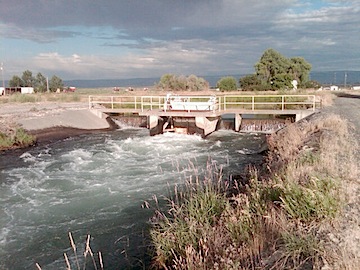
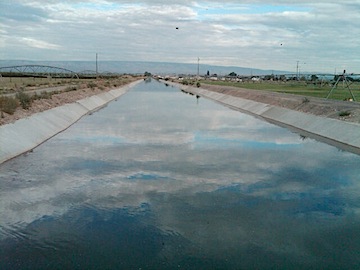
Canal
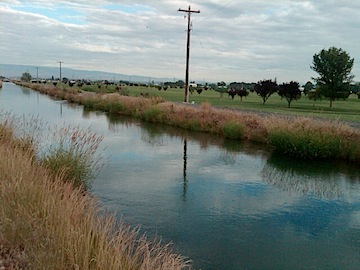
A shot looking west up the canal from the first bridge.

Second Bridge
The second bridge is exactly 1.3 miles from my RV.

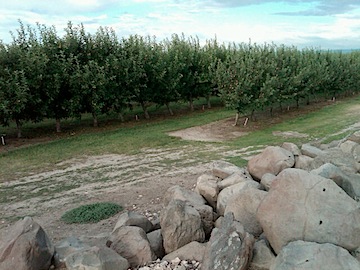
Apple Orchard
I walk for about a half mile alongside this apple orchard. This morning, I saw three woodchucks in rocks like these along the canal edge.

Last week, I began walking regularly. It’s part — the only part, I should admit — of an exercise regime. I know it’s not much, but it’s more than I was doing the week before.

I usually get out between 6:30 and 7:00 AM, when it’s still nice and cool. I’m back within 45 minutes.

I should be clear here: I don’t go for a short stroll. I walk 2.6 miles at an average speed of 3.6 miles per hour. How do I know this so precisely? Simple: I monitor my progress using the trip computer on my handheld GPS.

(While other people are relying on a touch-screen GPS with computerized voice to find their way around town, I use my GPSes for things I can’t easily do on my own. But let’s not go there, huh? That’s fodder for a whole other blog post.)

I took the photos you see here on this morning’s walk. The pauses brought my average speed down to 3.3 miles per hour.

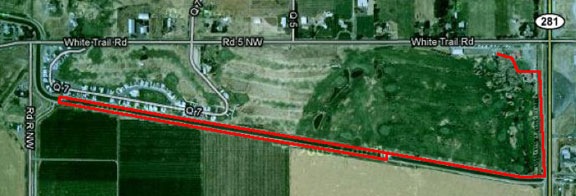
I start at my RV at Colockum Ridge Golf Course. I cut through the golf cart staging area and past the maintenance shed. That puts me on a two-track gravel road between a narrow drainage ditch full of clear-running water and the golf course. I walk about .3 miles south, then make a right onto another gravel road that runs along the north side of a canal. If I’m lazy, I cross the canal at the first bridge and come back along the other side for a 1.2 mile walk. But if I’m serious about exercise, I continue to the second bridge. The whole time, I’m walking alongside the golf course and then the 55+ trailer community beyond it. When I cross the second bridge, I walk back along the south side of the canal with an apple orchard and then an alfalfa field on my right. I cross back over the first bridge and retrace my route back to my RV.

Here’s what it looks like in satellite view on Google Maps:
My Walk

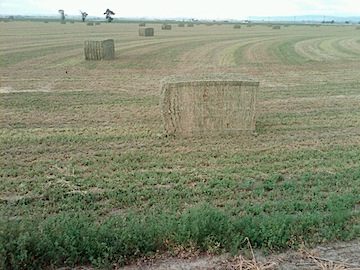
Alfalfa Bales
These aren’t the little wimpy alfalfa bales we bought for our horses. These probably weigh 500 pounds each and stand nearly as tall as me.

Canal and Golf Course
A view of the golf course from the opposite side of the canal.

I really enjoy the scenery. I love the changes in the farmland. Yesterday, the alfalfa was cut and piled. Today it was baled. The apples are ripening. Some farm equipment off in the distance was harvesting soybeans or something. The groundhogs are kind of cute.

3.6 miles per hour is a good walking pace. It’s probably the pace I used regularly when I walked the streets of New York. If you don’t walk fast in Manhattan, you get run over by other pedestrians or messengers on bikes or guys pushing racks of clothing. (I spent a bunch of time in the garment district one summer.) I’d like to get my walking speed up to 4 miles per hour, but it would likely kill me.

I listen to music when I walk. I have a little iPad shuffle and keep it stocked with an ever-changing mix of my favorite music. I discovered the other day that my walking pace is at the same tempo as Paul Simon’s “Late in the Evening.” I have long legs so I have long strides. I feel it in my knees and hips.

When I get back to the trailer, I’m sweating like a pig. (Do pigs really sweat?) I force myself to drink water or vitamin water before jumping in the shower. When I’m that hot and sweaty, the shower feels like heaven and makes the walk worthwhile. Afterwards, I have breakfast: high fiber cereal with fresh berries and low-fat milk. I have coffee before the walk — I am human, after all.

According to the Walking Calories Calculator on About.com, I burn at least 259 calories each time I do my walk. That’s not very much, but it is better than nothing. I’m hoping the regular brisk walk will also help me recover some of my muscle tone, which is quickly melting away.

I’m middle-aged now, and I’m not going down without a fight.

Interlacing Woes

One part of my current troubleshooting effort.

I’m trying very hard to create an SD DVD based on original 1080i HD footage. I have the latest version of Final Cut Studio, which should have all the tools I need to get the job done. But when I build a DVD, it looks like crap on my HD TV. Other standard DVDs look fine — actually, great — on that TV. For the past two days, I’ve been banging my head against the wall, trying to figure out the problem. Not having a standard TV handy for testing purposes, I have no idea what it looks like on one of those.

I hate learning by trial and error. I watched Lynda.com video courses about Final Cut Pro and DVD Studio Pro and they helped me build my movie and DVD. But they failed to explain how to get my kind of video (1920x1080i60 AVCHD) into standard DVD format. Do I convert video before bringing into FCP? If so what do I convert it to? How about interlacing? Downsizing? What compression schemes? What settings? And what about the anamorphic setting? Does that still apply with current technology?

To make matters worse, answers in forums tend to be vague. They’ll recommend a compression scheme, but when you go to the menu of options, what they mentioned doesn’t appear exactly as they referred to it. Instead, there are four or ten or twelve options it could be. Other times, when you make changes they recommend, the appearance of the video changes drastically; for example, turning on the anamorphic check box in FCP sequence settings squishes the picture, making everyone look short and fat. Do I need to change the shape of the pixels, too?

And what about the contradictions? One guys says do A while another guy says do B, which is completely different.

What I need is a recipe, a starting point, a list of steps that should work. Then, like a chef, I can fine-tune the recipe to see if I can make it any better.

Right now, the challenge is focusing around interlacing. Interlacing is one method of scanning video; progressive is the other. My camera shoots interlaced video. There’s no progressive option. TVs supposedly can de-interlace on the fly; I don’t know if modern HD TVs can, though. Computers can’t. The result is a kind of flicker anywhere there’s motion. Like in a video clip of a cherry orchard filled with trees that have leaves that flutter in the wind. Ugh.

One source says I must de-interlace before the video is downsized to SD for DVD. Another source, supposedly an “expert,” says de-interlacing “doesn’t work.” (WTF does that mean?) How do I know what’s right?

I decided to give it a try. FCP has a de-interlace filter. It took a while to figure out how to use it. FCP’s documentation doesn’t discuss all of its settings, making it just a little bit more challenging to figure out. I wound up running the filter once on the sequence and then again on the same sequence to see if there was any improvement. Here’s a series of three screenshots of a full-sized clip on my iMac monitor:

This is the “before” shot. You can clearly see the interlacing in the picker’s hat:
Interlaced

This is the first “after” shot. In this example, I’ve run the de-interlace filter on the video to remove interlacing. There’s an immediate improvement.
Deinterlaced

This is the second “after” shot. In this example, I ran the de-interlace filter twice. The first time was to remove interlacing (as above) and the second was for “max” flicker removal.
Deinterlaced and Deflickered

I don’t see a difference between the second and third screenshots — do you? I’m assuming the difference would be in motion. But I can’t view both videos at the same time; my computer chokes on the task. (Remember, they’re both 1920×1080 pixels.

And, stepping back to look at the big picture, I’m not even sure I’m supposed to de-interlace this video as part of my workflow. This could be a big waste of time!

If you have experience with this and can advise me, please do. Use the comments link. Also let me know if you know of any good, recent online resources to help me understand HD to SD conversion, interlacing, and anamorphic settings. Reading “how-to” information written 5+ years ago doesn’t help much, given the changes in technology and software capabilities since then.

Two More Video Camera Accessories

One for sound, one for video.

HandyCam.jpgAbout a year and a half ago, I bought a Sony HDR-CX12 Handycam. It’s a mid-range consumer model that shoots in full 1080i HD. I bought it to fill in the gaps of the video needed to finish up a video project and, since then, have been using it on and off to shoot stock video footage. The quality of the video is amazing for such a compact and relatively inexpensive device. These days, you can get something even smaller and less costly that does the same thing.

I shot all of Cherries: From Tree to Truck with this camera. Once you get past the inconvenience inherent with the AVCHD format and have the right tools to edit, it’s really a pleasure to work with. One feature that few people talk about is the ability to archive the 4GB Memory Stick PRO Duo cards to DVDs. You can later mount up a DVD and import media into your computer, just as if you’d attached the camera or inserted a card into a card reader.

Last year I started a project that required me to do some interviews. I used a friend as a guinea pig (so to speak), interviewing him outdoors in front of his helicopter, using my camera on a tripod and a wireless microphone clipped onto his shirt. The result was disaster. The sound was gawdawful, rendering the “talking head” video completely worthless. Clearly, I needed a better sound solution.

Sony ECM-HST1Of course, the camera is a consumer model and is extremely limited in compatible accessories. But today I poked around on the Sony Web site and tracked down a stereo microphone that might do the job — if I keep the camera out of the wind. It’s a Sony ECM-HST1 microphone, which fits into the camera’s hot shoe and draws power directly from the camera. It’s not what I really wanted — I wanted a lapel mic — but it’ll have to do.

Opteka OPT-SC37FEWhile I was surfing around for the best price, I stumbled upon this little gem: the Opteka OPT-SC37FE Ultra Fisheye Lens for Digital Video Camcorders. I already have a wide-angle lens for my camcorder, but there’s nothing like a very wide angle lens to get interesting effects or get up close and personal with your subject matter. The video clip on Opteka’s Web site certainly makes it look like a useful and fun accessory. Since I owed myself a birthday present anyway, I sprung for that, too.

What’s all this for? Well, in addition to finally getting to the big project I started nearly two years ago, I have a smaller, related project in mind. Both of these tools will help me capture the video I need to do it.

At least that’s what I keep telling myself. We’ll see.