PhotoJeeping: A Trip to Dragon Mine

I’m almost surprised we found it.

The wildflowers in the Sonoran desert around Wickenburg have been amazing lately — too amazing to ignore. So yesterday afternoon, I decided to tack a little PhotoJeeping excursion onto the end of my errands. Along the way, I picked up my friend Janet, who is an artist and likes photographing the desert almost as much as I do. We also squeezed in Jack the Dog and Janet’s dog, Maggie; they sat on the back seat beside the recycling bins.

Backlit Lupines

Lupines, backlit with late afternoon sunlight. (Click for larger view.)

At first, I’d considered another trip up Constellation Road. The last two times I was up there, the flowers hadn’t been blooming yet. Surely they must be blooming now. But when my errands called for a stop at the Shell gas station just south of town (they stock AeroShell aviation oil, if you can believe that), I thought about the desert southeast of Wickenburg. Dragon Mine was an old mine site I’d visited by Jeep years before with some friends. I thought that perhaps the juxtaposition of mining ruins and wildflowers might make a good subject.

Trouble was, I didn’t remember how to get there and hadn’t brought along my GPS.

So after one wrong turn that dead-ended in a subdivision, we tried another left turn off Grand Avenue and headed eastbound. The road wound through a subdivision and, at its east end, we spotted a dirt road winding down the side of a shallow canyon wall into San Domingo Wash. I followed the road.

Although this particular road had tire tread prints on it, the tracks were very close together. It wasn’t a Jeep road, it was an ATV road. It was painfully narrow at places — so narrow that I almost turned back several times. But I squeezed the Jeep through one narrow place after another, trying not to be bothered by the sound of branches scraping up against the side. I was glad I’d left the doors on; we would have been beaten up by thorny branches if I had taken them off. The floor of the canyon was rocky and then sandy and then rocky again, with short, steep climbs and tight turns. The Jeep, in 4H, performed admirably, as usual. The wheels spun just enough in those turns to give the illusion of a 90° turning radius sometimes. It was fun.
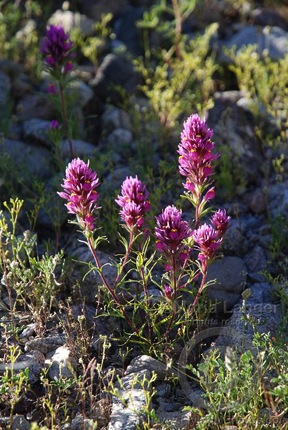
We stopped a few times to photograph flowers here and there. At one place, I captured a so-so image of lupines backlit by the sun, along with a shot of owl clover. The whole time, however, I was really looking for a trail that would take us out of the narrow track we were in. Something that would be easier to drive and get us to our destination — if we could find it — quicker.

Janet scouted ahead a one photo stop and found where the ATV trail climbed up a short hill to intersect with a nice dirt road. This was probably the road we were supposed to be on. I pulled up onto its relatively smooth and definitely wide surface, glad to be out of the wash.

We continued mostly eastbound, heading toward the low mountains in line with San Domingo Peak. As we drove, we kept a sharp eye out for the wildflowers we wanted to photography. The light was behind us and relatively low; it was nearly 5 PM and the sun would set in less than two hours. That gave us a great view of the scenes on either side of the road as we traveled east.

Strawberry Hedgehog Cactus

This “Desert Still Life” features a strawberry hedgehog cactus, the “skeleton” of a cholla cactus, a blooming creosote bush, and an iconic saguaro cactus, all under a perfectly blue Arizona sky. (Click for a larger view.)

I caught sight of a blooming hedgehog cactus about 100 feet off the side of the road and pulled to a stop. We got out and explored the area on foot. I’ve been trying hard to do all my photos with a tripod these days and although it’s a bit of a pain in the butt, I admit that I am getting used to it. After doing a few ho-hum horizontal shots of the cactus and its flowers, I scrunched down on the ground and took a look though the lens, holding it vertically. I liked what I saw. I made several shots, with and without a polarizing filter and at different angles to get the photo you see here.

There’s a certain feeling I get when I know I’ve captured a good image. I’ve felt it before, several times. I can see the image in the tiny video screen at the back of the camera, but as I age, my close vision is deteriorating so I can never really see it to be sure. It’s only when I get back home to my computer and can view it on a 24″ monitor that I know whether it’s good. I’ve been disappointed many times, but not this one. I’m very pleased with this image and think it might just be the best I’ve ever captured.

I didn’t know that for sure yet, so the rest of the trip was a slow drive toward our intended destination with me wondering whether I’d be disappointed. We made several stops and took more photos along the way. For a while, it seemed to me that the road was getting too close to the mountains. But then it swung to the north and we passed a big flat area that I remembered being south of the mine. A while later, we rolled up to the mine site and climbed out.

Marigold Steps

Desert marigolds bloom alongside the ruins of a long-abandoned mine. (Click for larger view.)

The shots I took there weren’t anything special. There’s a lot of concrete shapes, such as the stairs you see here, and plenty of metal and wood. There are two mine shafts — a vertical one at the top of a small hill and a horizontal one that enters the area from the small wash on the north side. They might join somewhere under ground; I don’t know and don’t plan on every finding out. (Exploring mines is dangerous, folks.)

It was nearly 6 PM when we were ready to move on. I was hoping to take a different and better route back. So we continued along a road that headed west from the mine. I was pretty sure it was the road I’d taken back on our last visit years before. But it swung around to the north and then the northeast. This was wrong. We wanted to head west or northwest. My gut told me to follow it, but my brain reminded me we were headed in the wrong direction. Sunset was in less than an hour and the light wouldn’t last long afterward. I told Janet that she should never allow me to take her out in the desert again without my GPS.

We followed the road for another five minutes. It headed east and north and northeast. Just when I was getting ready to turn around, it intersected with a broad, sandy wash. The tire tracks of previous travelers headed up and down the wash. Down the wash was west, so we made the left turn. I threw the Jeep back into 4H and we sped down the wash.

Topo Map

This topo map offers an overview of the path we took. I was able to map it pretty well using the points plotted by my GPS data logger. (Click to see a larger view.)

It was a long drive — maybe as many as 5 miles. The wash twisted and turned, but always headed mostly west. The sun, now very low in the sky, cast long shadows that shielded our eyes from the glare when the canyon walls were high, then blinded us when the canyon walls dropped. It turns out that we were in Monarch Wash. We passed through a gate that had been left open — without a “Keep Gate Closed” sign, we left it that way — and eventually wound up on Grand Avenue, about a mile north of where we’d turned off nearly three hours before.

It was a good little trip that might have been made better by having my GPS along. (Frankly, I still can’t figure out why so many people depend on them when traveling on paved roads with signs. But that’s another blog post.) Best of all, I managed to capture one of the best images I’ve made so far. That’s plenty of reward for the dust in my hair and clothes.

The Trouble with Troubleshooting

I troubleshoot a Photoshop CS3/Mac OS X 10.6.3 problem.

Yesterday, after composing a blog post on my MacBook Pro, I went into my office with an SD card full of photos with every intention of choosing one or two to include in the post. I copied the photos to my hard disk along with my GPS track log and geotagged the ones I could tag. Then, after using QuickLook to make a preliminary selection, I opened five images with Photoshop CS3.

Or at least I tried to.

The problem was that Photoshop wouldn’t launch. It kept “unexpectedly quitting.”

And so began more than 2 hours of troubleshooting that culminated with my making an appointment today to visit the Arrowhead Apple Store down in Peoria, 50 miles from my home.

If you’re having this problem and are looking for a solution, read this post that I wrote this morning for Maria’s Guides.

This post is mostly about what a pain in the butt troubleshooting can be.

My troubleshooting process began with a Google search for Photoshop CS3 with Mac OS 10.6.3. I suspected the problem had to do with my update to 10.6.3 the previous week and I turned out to be right. There were discussions going on in the Apple forums about the problem. The most promising was titled “Installed 10.6.3 and now Photoshop CS3 won’t open.” The thread originator posted a quick description of the same problem I was having and got (so far) 167 responses.

Sadly, the responses were distributed over 12 individual pages, so I’d scan a page, click Next, and wait for the next page of responses to load before I could continue scanning. I don’t have a fast Internet connection in Wickenburg, so it was time consuming and tedious.

But it’s the content of the responses that I have a problem with. Only about 1/3 of them were of any use. The rest fell into one or more of the following categories, listed here with my comments.

  • Did you restart your computer? A person who can find and post a request for help in an Apple forum is likely smart enough to try restarting the computer before looking for outside help.
  • I’m using Photoshop CS3 with Mac OS 10.6.3 and I’m having that problem, too. Okay, what else can you tell us to help us troubleshoot?
  • I’m using Photoshop CS3 with Mac OS 10.6.3 and I’m not having that problem. So the rest of us are imagining it? Why not provide some info so we can learn how our systems differ from yours?
  • Did you try doing ABC? This comment might be helpful the first time ABC is suggested, but when it’s suggested a half dozen times and people have already reported that it doesn’t resolve the problem, it is a waste of time. Please read all the suggestions and the responses before adding your own.
  • It’s Apple’s fault. They don’t test updates. Don’t waste my time with this bull.
  • It’s Adobe’s fault. Their software sucks. Don’t waste my time with this bull, either.
  • It’s because you’re using a Mac. This problem doesn’t happen on Windows. What the hell are you doing on an Apple forum? Go play with Bing.
  • XYZ Program is better for photo editing than Photoshop. You expect me to toss a costly program I’ve been using for 15 years just because of a [likely minor] incompatibility issue? Get real.

It would be great if Apple’s forums had a way to vote down unhelpful comments so only the helpful ones appeared. I think we could have weeded out at least 100 of the comments that hid the solution. Or, better yet, offer some way to flag the comment that actually contains the “answer.” After all, the discussion thread was marked “answered,” so someone must have recognized one of the posts as a solution.

Adobe’s Web site had a TechNote that offered three possible solutions. One, which suggested turning off Rosetta, did not help me, since Rosetta was not enabled for Photoshop. I’m pretty certain the problem is related to an incorrectly entered serial number after having my logic board replaced two years ago. That’s what’s taking me and my 40 pound, 24″ iMac down to Peoria in two hours. Evidently, there’s no way for an end user to fix a serial number issue.

The net result of all this is that I lost two hours of my life to a troubleshooting exercise and will lose another three hours making a trip down to the Phoenix area to get a problem fixed on my Mac that was introduced by Apple.

Side benefit/drawback: I will get my hands on an iPad so I can give it a test drive. If they’re in stock, I’ll likely walk out of the store $500 poorer.

How a Tripod Can Make You a Better Photographer

My take.

Last month, my husband Mike and I went to a photography lecture at the Desert Botanical Gardens in Phoenix. (If you’re in the Phoenix area and have never been to the DBG, treat yourself; you won’t be disappointed.) The lecture was given by Arizona Highways magazine photo editor Jeff Kida and covered photographing wildflowers. (Jeff took the excellent portrait of me that you’ll find on this Web site and elsewhere; I wrote more about him and this photo in February.) We’d had a very wet winter and although the desert was greening up at the time, no one was sure whether we’d have a good wildflower season. So far, it’s turned out to be spectacular in certain parts of the Phoenix area, including Wickenburg, where I live.

Poppies and Desert Chicory

Desert chicory’s white flowers among golden poppies. (Click for a larger image.)

The lecture included a discussion of equipment and that equipment list included a tripod. I have a tripod — in fact, I’m ashamed to say that I have numerous tripods, far more than any one person should have. (I was always looking for the right tripod and have finally zeroed in on a good combination with a Manfrotto tripod and ball head.) And I agree that everyone serious photographer should have a tripod.

But then Jeff said something I’d never thought about. I wish I could remember his exact words. The gist was that using a tripod would automatically improve your photographs.

Whoa. This was something that interested me. Although I have all these darn tripods, I don’t use them very often. Maybe I should.

A Tripod Eliminates Camera Shake

I mostly use them for low-light situations when I absolutely must have a tripod. After all, a tripod’s main purpose is to hold the camera steady to take the shot. When used with a cable release (or similar device) or the camera’s built-in timer, motion from external sources should be eliminated. The final image should be clearer. But that was low light. Surely on a bright sunny day — just about every day here in Arizona — a tripod wouldn’t be necessary.

I also put a lot of faith in my camera’s VR (vibration reduction) lenses. I have two of them now and I can clearly hear the VR motor kicking in when I prepare to take a shot. Surely that would help keep my camera steady for each shot.

Poppy Blanket

A blanket of poppies and other wildflowers cover a hillside in the Sonoran desert near my home. (Click for a larger image.)

But since that lecture, I’ve been giving my photography a lot of thought. For the past two years, I’ve noticed a serious decline in the clarity of my photos. I was beginning to think it was the camera (a Nikon D80, now 3-1/2 years old) or my preferred lens (a Nikon 16mm-85mm zoom). Perhaps one or both of them needed adjustment or cleaning. I even went so far as to print out warranty repair authorizations for both of them in preparation for sending them back to Nikon for inspection, cleaning, and possible repair.

Perhaps the problem wasn’t my equipment. Perhaps it was me. Maybe I think I’m holding the camera steady for each shot or that there’s enough light to get the image, but maybe I’m moving the camera when I “snap” the photo by pressing down on the shutter release. Maybe I’m ruining my own photos. Or at least preventing them from being as good as they could be.

I decided to experiment by using my tripods and cable release more often. By ensuring that there’s no camera shake when images are being captured, I can eliminate camera shake as a cause of my problem. If the problem persists, I know it’s either bad focusing on my part or the camera’s. Since I don’t have the best vision, I trust my camera’s autofocus feature to get the focus right. So either I’m not telling the camera to focus on the right thing (my fault) or the camera can’t focus properly (the camera’s fault). Using a tripod would help me troubleshoot the source of the problem.

Using a Tripod Forces You to Slow Down and Compose Properly

Vulture Peak Poppies

This is my secret poppy place on the east side of Vulture Peak near Wickenburg, AZ. (Click for a larger image.)

I went on a photo shoot the other day out in the desert near my home. The poppies were blooming and I knew exactly where to find a lot of them. (Hint: Getting there requires a Jeep, ATV, or horse.) We took the Jeep out and found the poppies right where I expected them. We also found lupines, chicory, and a bunch of other flowers I didn’t even know existed.

The big problem with the site is that the flowers covered a steep hillside. Setting up a tripod was a royal pain in the butt. I admit that I cheated and took quite a few shots the lazy way. But then I remembered my mission and went through the bother of setting up my tripod and cable release and framing the photos. It slowed me down considerably. But I reminded myself that I wasn’t in a race. The best light was already gone for most of the day and the flowers weren’t going anywhere.

And that’s when I realized that using a tripod had yet another benefit: it forced me to slow down and pay close attention to what I was doing. It forced me to try harder to make every shot count. Because of all the extra time and effort required to make each photograph, I was motivated to put more effort into composition.

Could that be what Jeff meant?

The Jury is Still Out

The few photos on this post are among those I made that day. In general, I’m more pleased with the quality of the images. But I’m not done testing to see if the problem is with me or my camera. It’ll take more photo shoots with the tripod to convince me.

In the meantime, it’ll be interesting to see if I can shoot better photos just because I’m using a tripod.

Any thoughts on this? I’d really like to get some feedback from other photographers.

Walking the Fence

Part of ranch maintenance — even for our tiny “spread.”

About 10 years ago, interested in finding a summer place where we could go with our horses to escape the summer heat of the Phoenix area, we purchased 40 acres of ranch land in northern Arizona. Our lot at Howard Mesa Ranch is high desert land atop a mesa between Williams and Valle, AZ, about 40 miles south of the Grand Canyon.

Originally, we had high hopes of putting a vacation home up there. Our lot has 360° views that include Red Butte and the north rim of the Grand Canyon to the north, Mount Trumbull and its companion mountains on the Arizona strip to the west, Bill Williams Mountain to the south, and the snow-covered San Francisco Peaks to the east. We envisioned a 2-story home with a loft bedroom and big windows looking out over the views.

In preparation, we got a pair of water tanks, put in a septic system, and had the entire place fenced off with a 4-strand wire fence (smooth wire top and bottom, barbed wire in the middle per the CC&Rs). When we came up with our horses, they had 40 acres to wander and graze on.

But things change. We never built our vacation home. Maybe we will one day in the future, but I don’t know when that day will come. In the meantime, we camp out there on long weekends throughout the year. We’ve spent numerous July 4th weekends, several Christmases, and even one Thanksgiving at our off-the-grid retreat.

Like this weekend. We came up, mostly to check on the place and take care of some maintenance tasks. There’s a shed on the property that needs to be checked on regularly. And, of course, the fence.

Mike at Fence

Mike standing by the east side of our fence. That’s the San Francisco Peaks in the distance.

We walk the fence each time we’re up here. There’s over a mile of it, so it makes a nice walk. We’d put up the fence to keep our horses in, but now it worked primarily to keep the open range cattle out. I didn’t keep the elk out, though. They could — and did — jump the fence. Sometimes, their weight on that top strand of wire would shift the fence posts and bend the stays between them. Walking the fence meant repairing problems caused primarily by the elk.

In the old days, when we still had horses, Mike would ride the fence on horseback. He’d saddle up his horse and my horse would follow them. I’d busy myself with some other task, leaving them to get the job done without me. But with the horses gone, the walk would take longer. Jack the Dog wouldn’t be enough company for Mike. So I went along with them.

I carried a roll of wire, Mike carried the fencing tool. We walked the fence line, stopping occasionally to straighten stays, bang post deeper into the earth with a big rock, or tighten wires. It was easy to see where the elk had jumped the fence. It wasn’t just one or two elk, either. It was likely an entire herd. We didn’t mind the elk on our property. After all, they didn’t damage anything, like cows would.

Except the fence, of course.

Frost Heave

The southeast corner fence post. Over the years, frost heave has pushed the post up.

The fence had been professionally installed by a company based down near our Wickenburg home. They’d come up about a year after we’d brought the property and camped out until the job was done. The workers probably enjoyed being away from the low desert heat for a week or so. I wonder what they thought of the dark sky with its billions and billions of stars at night, or the coyotes that trot through the property as if they own it.

On the whole, the fence guys did a great job. Where they dropped the ball, however, is on the corners. Sure, they dug about three feet into the ground and secured those corner fence posts with concrete. But what they didn’t count on was frost heave, which is something you just don’t see down in the Phoenix area. Each winter, the ground freezes solid. As the soil freezes, it expands. It pushes up whatever it can to make room. Over the years, it has pushed the corner fence posts out of the ground. The fence is still sound, but the four corner posts no longer stand properly. One of these days, we’ll have to fix them.

Dead Animal

One of two partial skeletons we found while walking the fence.

Along the way, I caught sight of something odd about 200 feet from the fence. I went to investigate. It was the partial skeleton of a medium sized animal. Based on its size, skull, and the length of its neck, I think it may have been a young elk or perhaps a mule deer. There was no sign of antlers, so I don’t think it was an antelope. The bones had been picked clean, as you can see in this photo. The legs and entire hindquarters were missing. Mike found the lower jaw about 30 feet away. We think it may have been injured jumping the fence — or perhaps had starved when the ground was snow-covered — and the coyotes and birds had finished it off. Later, not far from the north side of the fence, we found another partial skeleton that also included the neck and part of the skull. Another unfortunate animal. I wonder how many others are within our 40 acres — or beyond it.

As we walked, it was clear that a lot of snow had laid upon the ground for a long time. The long, dried grasses were flattened out as if they’d borne the weight of deep, heavy snow for weeks on end. I could imagine animals jumping the fence, looking for food. I could imagine young or weak or injured ones dying, providing food for the carnivores and carrion eaters.

It took about 90 minutes to walk the fence and make the necessary repairs. By then, it had clouded up a bit and we were ready to take a break in the warmth of our camping shed. The job was done — until next time.

Another Lazy Job Seeker

It’s so easy for them these days, but they still take the lazy way out.

When I was getting ready to graduate college with a BBA in the early 1980s, my school provided some advice about how to look for a job and prepare for an interview. There were basically two different paths:

  • For a posted job opening, research the company to see whether it would be a good “fit.” The write a cover letter to send in with your resume that explained how you not only qualified for the position but could bring additional benefits to the company.
  • For a company you wanted to work for that didn’t have any posted job openings, research the company to learn more about it. Then write a cover letter to send in with your resume explaining what job or department or division interested you and how you could benefit the company.

There’s an underlying theme here: research the company. Learn about it. Understand what it did and how you might fit in. Even if the job you were looking for wasn’t available, the person on the receiving end of your cover letter and resume might realize that you’d done your homework and that might make enough of an impression to forward your resume to someone who was hiring people like you.

In those days, researching a company meant going to the library, tracking down annual reports, and combing through the periodicals Index to find articles about the company. It meant microfilm and microfiche. It mean spending an hour or two or even more to gather enough information to become informed about the company and sound that way if a phone call came. If you got an interview, it was back to the library to learn even more.

These days, we’re lucky — oh, so very lucky — to have the Internet. Researching a company is as easy as visiting its Web site or Googling its company name. All the information you could possibly want — and more! — is there, at your fingertips, in the comfort of your dorm room, living room, or a coffee shop.

Yet people still continue to take the lazy way out, sending generic e-mail messages to anyone they find online that might possibly have a job for them. In many cases, they don’t even bother to research the company and possibly job openings while they’re on that company’s Web site. Instead, they zero in on the Contact Us page or link and paste in their job request.

Here’s the most recent gem to cross my e-mail inbox:

I am seeking an internship position in the helicopter industry and was wondering if your company has any positions available in Phoenix. I am approaching my senior year in my Bachelor’s Degree in Aviation Administration and training for my Instrument and Commercial Rotorcraft Rating. I am very interested in doing an internship with your company so any information would be greatly appreciated.

Contact FormI should note here that this e-mail message was sent using a form on Flying M Air’s Web site, which is reproduced here as an image (reduced to fit). At the very top of the form is the parenthetical statement, “Note to Pilots: We are not hiring.” I added this when I got tired of getting e-mail messages very similar to the one quoted above. I figured I’d just tell them up front that no jobs were available so they wouldn’t waste their time — or mine. Evidently, reading the page the form was on was too much for this soon-to-be-college graduate.

I composed a response:

You’re “very interested in doing an internship” with my company? Really? What do you know about my company?

I’m sure you sent this same message out to every helicopter operator in the Phoenix area who you could contact. Copy and paste makes it pretty easy these days. Are you just as interested in working for all of them?

And tell me: when you used the contact form on our Web site, didn’t you see where it said “Note to Pilots: We are not hiring?” Did you think that somehow did not apply to you? Or did you skip over all the information about my company and that note right above the form so you could quickly fire out yet another generic request for work?

Did you ever think that maybe you should put a little more effort into your job hunt? That some people in the industry aren’t interested in hiring lazy people who can’t be bothered to learn about a company or read available information about job openings — or lack thereof?

Still interested in doing an internship for my company?

We’re not hiring.

I’ve said it before and I’ll say it again: I can be a real bitch. But I didn’t send this. Instead, my husband and I agreed on a better response:

Information about job availability can be found on our Web site.

This is actually a more evil response. It will require him to do some work:

  1. Figure out what our Web site is. I didn’t include a signature line with the URL and my e-mail domain name does not match that of my company.
  2. Search the site to find the one place — which is right above the form he used to contact me — where it says we’re not hiring.

And why shouldn’t he put a little effort into a job hunt? Won’t he be required to work if he gets a job?