Cataloging Video

Didn’t I pay someone to do this?

A few months back, you may have read various blog posts and tweets from me regarding a video project I’m working on. October was the big film shoot and I the guys I hired and an enormous amount of money to do the project shot about 10 hours of raw video footage all over Arizona.

At the conclusion of each day of the shoot, I was assured that they shot “awesome” footage and that the final product would be “mind boggling.” I assumed (silly me — when will I learn?) that these guys knew what they were doing, so I didn’t micromanage, as I sometimes do. I then sat back and waited for the promised hard disk full of footage (my copy) and the shot log.

When You Want Something Done Right…

I waited a long time. Weeks. What I finally got was three sheets of paper with print so tiny I couldn’t read it — even with my cheaters on. There was virtually no usable information and the list of scenes didn’t cross reference to any video clips by name or any other identifying information. In other words, the catalog was useless.

So it looked as if I’d have to do it myself.

After all, I needed a catalog so I knew what video I had to work with. I needed to know what video was good and whether anything needed to be reshot. I needed a reference I could consult to write my script and make sure I had footage to illustrate everything I wanted to talk about.

I also got the raw video on a 500GB Seagate drive. I assumed (dumb, dumb, dumb) that it was neatly organized and that all the clips would be in some kind of order. But when I plugged it in, I discovered that there was no rhyme or reason to the organization on the disk. Files and folders were randomly named and there were backups of some files on the same hard disk — resulting in duplicates. Video was in multiple formats, some of which simply could not be read on my Mac with the tools I had. I spent two days hunting down conversion software that would enable me to open video files in formats that included MTS, M2T, M2TS, DV, WMV, AVI, and MXF.

This is what I had to catalog.

And that’s what I’ve spent a total of 3 work days doing so far. I’m about 1/4 done.

The Nitty Gritty

Sample MOV FileTo give you an idea of what I’m working with and how I’m dealing with it, consider the screen shots here. The first shot shows a frame of a movie I’m reviewing. I converted its original high definition format to QuickTime for easy viewing. The movie was shot from my helicopter while flying over Lake Powell. It shows a particular stretch of shoreline. I need to know — at least approximately — where on the 135-mile long lake this shoreline is.

Enter Google Maps. I displayed Lake Powell in a big browser window and, based on my knowledge of the lake, zoom in to an area I think the footage might correspond to. This is made slightly easier by the fact that most clips are in named with numbers corresponding to the order in which they were shot. So if a specific piece of shoreline falls between two easily identified canyons, I can usually find the shoreline on Google Maps.

Sample on Google MapsHere’s the same place on Google Maps. And yes, I’m sure it’s the same place.

Then I whip out my handy Stan Jones map of Lake Powell, find Google Maps location on the map, and use a FileMaker Pro database to enter the corresponding lake mile marker as part of the clip’s description. I add some other info about the clip, including its time, a rating on a scale of 1 to 5, and a screenshot of a representative scene.

I only have to do this about 1,000 times.

There are several problems with this technique:

  • The water level determines the appearance of the shoreline. Google Maps has the highest water level and Stan Jones has the lowest. Our video is right in between.
  • Google Maps uses satelite images. Those images point straight down. In most cases, our video is shot at an angle to the scene, at various altitudes.
  • On Gootle Maps, north is always up. On our video clips, north can be any direction.
  • The direction we’re flying and the videographer who took the shot determines which shore I’m looking at. I have to think back to those October days to remember what we did and when, including what time of day.

So matching things up isn’t as easy as you might think. And if you think it’s easy, come on over and give it a try. You can buy the drinks when you give up.

And no, I really didn’t expect the videographers to catalog clip locations right down to the mile marker. What I expected was something like “Bullfrog Area” or “Near Escalante” or “Downlake from Rainbow Bridge.” That would have been a starting point, something for me to work with.

Anyway, I spent all day today doing this and will likely spend all day tomorrow and most of Wednesday. I need to get through all the Lake Powell aerial clips by then. I make good use of my two 24 monitors for this job, putting the QuickTime, FileMaker Pro, and Finder windows on one display and Google Maps in a big browser window on the other display. The thought of doing this on a 15 inch laptop pumps up my blood pressure. The sooner I get it done, the sooner I can move onto other things.

On Keynote Queues

Wondering about the kind of person who would wait in line overnight to see an Apple keynote.

I’m not going to Macworld Expo this year. I used to go regularly and didn’t miss a show for about 10 years. Then I started skipping them. It just didn’t seem worth the time and expense. I went last year but am skipping this year.

I always watch the Apple keynote presentation, though. For a while, it was available as a live Webcast. Since then, it’s been available a day or two afterwards as a streamed QuickTime movie. That’s good enough for me.

Evidently, it isn’t good enough for some people. When I finally tracked down the date and time for this year’s Keynote address on the Macworld Expo Web site, I also stumbled upon some information for attendees wishing to see the presentation live. Here’s part of the instructions:

FOR PLATINUM PASS ATTENDEES:
As a Platinum Pass attendee, you have priority seating to view the Keynote in the main presentation room, based on availability. You may queue up on line any time beginning Monday evening, along 4th Street adjacent to the Moscone Center. We urge you to make every effort to be on line by 7:00am Tuesday morning to ensure your place in the queue, as we cannot guarantee seating late arrivals. Show management staff and security will be present to assist with any questions.

I should probably mention here that the folks who have “platinum passes” spent $1,695 to get them — if they bought them before December 1. If they waited, they paid $1,895.

I don’t know about you, but the thought of waiting on line in San Francisco overnight in January after paying nearly $2K for “priority seating” seems a little extreme. What kind of person would do this?

Now there’s a lot of hoopla over the fact that Steve Jobs is not doing this year’s keynote address. There’s even a bunch of whiners who claim they’re going to give Phil Schiller, who is doing the presentation, the cold (and silent) shoulder with each announcement. (These could be the same people who are willing to wait in line overnight to see a trade show keynote address.) So although I don’t expect a bunch of people to be standing out in the cold tonight on 4th Street (or Howard Street for the people who don’t have “platinum” passes), I do wonder how many people stood on line overnight in the past. Anyone have this info? Use the comments link or form for this post to share it.

Microwave Chocolate Cake in a Mug

I’m blogging this recipe so I don’t lose it. Again.

I found this recipe this past summer when I was stuck in a camper for four months. I made it a few times — a few too many times, if you ask me. Today, when clearing some nonperishable foodstuffs out of the camper, I found the cake flour and remembered it. I immediately wanted to make a cake for my husband to try.

I thought I’d blogged the recipe, but when I went to find it today, it wasn’t in my blog. I probably tweeted it and set a Delicious bookmark for it instead. But I have so many damn bookmarks, a Google search was a quicker way to find it again. I also found a bunch of similar recipes. Now I’m storing the one I used this summer in my blog so I’m sure to find it the next time I want it.

The original recipe was on dizzy-dee.com, which was so overwhelmed with traffic that the recipe (or apparently the whole site) had to be moved. You can now find it, with its photos, at http://blog.vault9.net/food/chocolate-cake-in-5-minutes/. My version is a tiny bit different and I skipped the photos.

Ingredients:

  • 4 Tablespoons cake flour (Do not use any other kind of flour if you expect good results.)
  • 4 Tablespoons granulated sugar (I tried making this with less sugar and it simply wasn’t sweet enough.)
  • 2 Tablespoons unsweetened cocoa
  • 1 Egg
  • 3 Tablespoons milk
  • 3 Tablespoons oil

Instructions:

  1. Mix the flour, sugar, and cocoa in the largest microwave-safe coffee mug you have. I recommend at least 16 ounces; any smaller and you’re likely to make a mess in your microwave. In a pinch, you could certainly use a 2-cup glass measuring cup.
  2. Add the remaining ingredients and mix well. Make sure the egg is thoroughly mixed in if you don’t want bits of egg white in your cake.
  3. Microwave on high for 2-1/2 to 3 minutes, depending on the power of your microwave. This is something you’ll have to test for yourself. My home microwave, which is ancient, is only 700 watts, so 3 minutes was perfect. My camper’s microwave is 1200 watts (for reasons I’ll never understand) and 3 minutes was too long.
  4. Watch the cake rise out of the top of the cup as it cooks. If the cup is too small, this is when it will overflow and make a mess in your microwave, so you might want to put a paper towel under the cup before you start if the cup isn’t very big.
  5. When the cake is done, invert the cup onto a plate. If you got the timing right, the cake will be thoroughly cooked, but still moist throughout. If you cooked it too long, the edges will be hard and somewhat dry. Either way, it will be slightly rubbery. But the flavor should be good.

There are other variations of this recipe out on the Web, but this one seems to be the easiest and most consistent, given that all of the ingredients are “raw.” For example, one recipe calls for hot cocoa mix and water instead of the cocoa, sugar, and milk, but every mix is different, so who knows how it might come out?

You’ll find the mug a bit difficult to clean without soaking. I suspect that if you coated it with spray oil and mixed the batter in a different cup before pouring it in to bake, there wouldn’t be a clean up issue. But since I’d rather wash one cup than two when camping, I’ve never tried this.

How to Annoy Other Helicopter Pilots

When a pilot’s attitude problem leads to safety issues.

Last week, Mike and I took my brother and sister-in-law for a day trip to a popular scenic destination here in Arizona. I’m purposely being vague here to obscure the identify of the subject of this post.

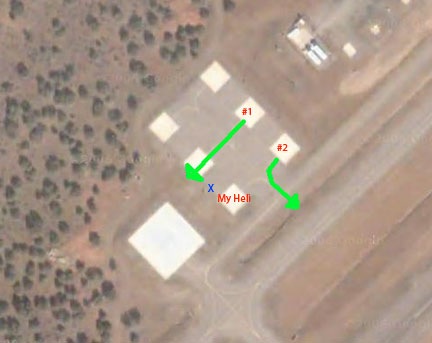
Helipad DiagramThe airport we landed at has a special helicopter area that consists of a large landing pad and six parking spaces. You can see the layout in the image here, captured from Google Maps. I’ve never seen anyone use the big pad. I parked in the spot marked “My Heli.” When I touched down, all the other pads were empty, although as we walked away, an Enstrom flew in and parked at the other end of my row of pads. He was gone before we returned a few hours later.

Some Background on the Parking “Turf War”

One of the helicopter tour operators at this destination uses the pads marked #1 and #2 in the illustration. About a year before, right after they started operating, I landed at the airport and attempted to set down in my usual parking space. A pilot was spinning on #2 and asked me to park on one of the other pads. Not knowing why — but assuming he had good reason to ask — I moved over.

I later discovered that he liked to take off through the spot where I normally parked and I was in his way. That kind of pissed me off. After all, I usually come with passengers and it’s a long enough walk to the terminal. My usual spot was the safest (pointing my tail rotor away from where people were likely to be walking) and most convenient (shorter distance to the terminal). I decided that I’d park there whenever the spot was available.

Another time when I came in for a landing, the same pilot asked me again to move over. When I said I preferred to park where I was, he said he was worried about damaging my blades as he went in and out of his spot. I didn’t say what I was thinking: how bad a pilot could he be that he couldn’t avoid another helicopter on such well-spaced pads? Instead, I told him I wasn’t worried and I used my blade tie-downs before leaving the area.

When I arrived the other day, I was glad that other pilot wasn’t around to ask me to move. Just in case he was out and about, I did tie down my blades.

An Unsafe Departure

We returned to the airport after a nice hike and walked back out to the helicopter. Now there was a tour helicopter on the pad marked #1. He’d just started up and was warming up the engine with passengers on board.

On the HelipadI wanted to get some video of my helicopter sitting on the pad with the scenery behind it as a jet took off on the runway. I asked my passengers to stand by the blue X while I did this. I assumed that the helicopter on pad #1 would depart along the markings in the helipad area. That’s what we’re trained to do. That’s why there are markings there. My passengers would be well out of the pilot’s way and safe — or as safe as possible in an active helicopter landing area.

I assumed wrong. The helicopter picked up to a 10-foot hover and hovered straight out toward the opposite pad, right next to mine. (See the straight green arrow in the illustration.) It was less than 15 feet from my waiting passengers as it paused at the back edge of the pad, over concrete and dirt. Dust, small pebbles, and grass clippings went flying all over us. Then the pilot took off, leaving us to brush debris out of our hair and clothing.

I was angry. The pilot’s departure was unsafe. Not only did his unusually high hover put his own passengers at risk in the even of an engine failure, but his proximity to us was downright dangerous. There was no reason for his departure route. He could have more safely departed across pad #2 (which was empty) or behind (above in the image) pad #2.

My husband, Mike, who is also a helicopter pilot, commented on the departure immediately, calling the pilot an asshole. I couldn’t agree more.

The other company helicopter returned from a flight and landed across from mine in pad #2. My group climbed into my helicopter and I started the engine. While warming up, the helicopter on #2 changed passengers. By this time, we had headsets on and were monitoring the radio. The pilot politely asked if I was ready to go. I told him I was still warming up and that he could depart. He picked up into a hover and hovered from the pad to the taxiway (see the bent green line in the illustration) — as I assumed the other helicopter would have done — and departed.

Teaching Me a Lesson?

I was almost ready to do my mag check when the first helicopter returned. The flight couldn’t have lasted more than 8 minutes. The pilot came in on the taxiway from the northeast and asked on the radio if the “Robbie” would hold position. (The way he said “Robbie” was definitely condescending; sit a guy in a turbine helicopter and he forgets what he learned to fly in.) I told him I would remain on the pad. As he taxied in for landing — before he even touched down– he told me that if I’d park at one of the other pads, I would be out of his way and my passengers wouldn’t get dusted.

This absolutely enraged me. This was obviously the same pilot who had told me to park elsewhere in the past. Apparently, he’d purposely hovered past my passengers — my family members putting them at risk — to teach me a lesson. Now he was making sure I understood. He also very condescendingly added that they like to see out-of-town visitors, but it’s better if they park on one of the other pads.

Until this point, the parking situation had been a turf war between the tour operator’s pilots and the other helicopters who land and park at that airport. But with this incident, it became a serious safety issue. I got extremely rude to the pilot on the radio — I admit it — and, after telling him that I didn’t like him putting my passengers at risk, I said that I’d park “Any damn place I wanted.” He told me not to “cuss over the radio” and then tried to smooth it over by saying he was trying to be courteous. I told him he should be safe first.

Why?

The question I have after all of this is, why?

Why should a pilot care where other pilots park, as long as they’re not in his assigned space?

Why would a pilot purposely put people on the ground at risk to prove a point?

Why would a tour company hire a pilot with an attitude like this?

As you might guess, I didn’t let this go. I reported it to the FAA. I did it more to get the incident on record than to initiate any kind of action. If anyone else complains, I want my complaint to provide additional evidence of an ongoing problem.

The way I see it, each pilot represents all other pilots. When one pilot does something stupid and dangerous, he’s making all of us look bad. I work too hard to keep my own operations safe and trouble-free to tolerate this kind of bull from a pilot with an attitude problem.

What do you think about this? Use the comments link or form for this post to share your thoughts.

Twitter Grader

A Twitter ranking tool that gives me a good grade.

I’ve been using Twitter for almost two years now and have tweeted more than 8,000 times. I follow about 90 people and have nearly 300 followers. Twitter has become a real part of my life.

So you’d think I’d rank a little higher in most Twitter user ranking algorithms. I don’t. I usually come out slightly above average — or sometimes even below average — leaving me to wonder whether I’m somehow tweeting wrong.

Twitter Grader LogoOne of the people I follow on Twitter, @Phillprice, tweeted his score on another ranking tool called Twitter Grader. I followed the link to get my own score. Imagine my surprise when I scored a 97 our of 100. Whoa.

So according to this one ranking tool, I’m actually doing something right. I decided to see how this is calculated. Clicking a link displayed the following information:

The Twitter Grade measures the reach and authority of a Twitter user.

It is calculated as a percentile score. A grade of 97.0 means that @mlanger scores higher than 97.0 percent of the 874375 users that have been graded.

  • The number of followers you have
  • The power of this network of followers
  • The pace of your updates
  • The completeness of your profile
  • …a few others

In the grand scheme of things, I don’t have many followers, but I guess the ones I have are good ones to have. I certainly can’t argue that I tweet at a brisk pace — a simple calculation puts my tweeting rate at an average of 12 tweets per day. And my profile is complete — although I can’t imagine it being less complete.

But a more careful read of the explanation gives me more food for thought. It says that I “scored higher than 97.0 percent of the 874375 users that have been graded.” (Emphasis added.) Maybe only the insecure, low-ranking users have tried this tool. And maybe I’m one of them.

So maybe I just rank high among the bottom feeders.

New Year’s Resolution: Stop checking out the Twitter ranking tools.